Review Promises
Keep each promise moving by reviewing participation and evidence. Taking someone onto a promise, approving their work, counting it, and confirming the promise are separate decisions.

Before you start
- Sign in to the steward dashboard with access to the selected garden. Get steward access if needed.
- Check the garden name at the top left, then open Garden → Promises. Read the target before signing.
- Have a steady connection for setup and direct changes. New money-reward promises, settlement configuration and payouts are deferred.
- Check the promise's terms, provider, team, requirements and confirmation rules. A contributing steward cannot confirm their own promise.
Steps
Review who takes it up
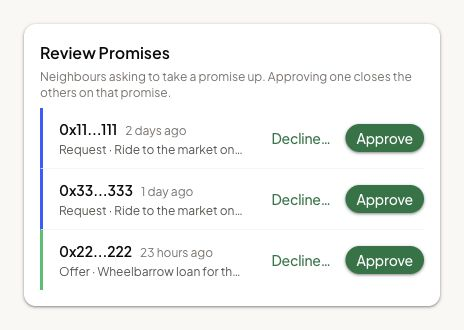
Open Review Promises in the pool. For each waiting request, check the promise, the account or garden taking it up, and any reason. Approving one person closes competing requests for that same promise. Choose Approve or decline the request once you have checked these details.
Acceptance sends directly when you choose Approve and confirm any signing prompt. Check the result before acting again. A request from a steward on behalf of another garden names that garden as the provider; the person who sent the request is a separate identity.
The pool may also allow eligible members to take promises up directly. Those do not need a separate participation decision from you.
Count work and check confirmation
Before readiness, check the team and contributions. Readiness freezes them. Nobody on that team may confirm the promise, even if they also have a steward role.
For garden work, use the existing Review Work guide to review the linked submission. A work item can be linked and approved without its approval being counted toward the promise yet. If it says Approved · waiting for a steward to count it:
- In Garden → Promises, open the affected promise and inspect its requirements and Recovery section.
- When Count Approved Linked Work shows approved links waiting, choose Count Linked Work.
- Read the named promise and the warning that counting can fix the team, then confirm Count Linked Work.
- Wait for Approved linked work counted. If it reads Waiting for indexed confirmation…, check that result before retrying. If a newer work decision needs review, return to the work record first. Do not ask the gardener to upload a duplicate.

If the promise requires an assessment, ask an evaluator or steward to make an assessment for the provider garden. Before readiness, choose Attach Assessment… when offered, then review Attach an Assessment and choose the current assessment that applies. If none is listed, record it for that provider garden first; an assessment from another garden does not fill the requirement.
Counted work that meets all required rows, together with any required assessment, can make the promise ready for confirmation automatically. Do not use Send for Confirmation as the garden-work readiness step. Other supported proof flows have their own send-for-confirmation action.
For confirmation:
- Open Hub → Confirm and check the selected garden in the header. It scopes your authority; a row can concern another garden's pool if this garden has permission to confirm it.
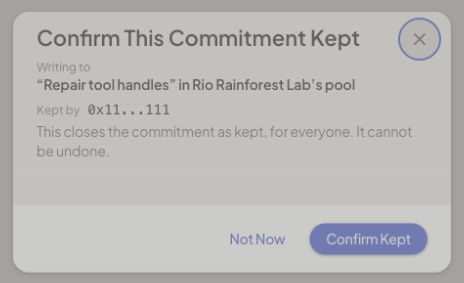
- Open Confirm Kept… and read the target, provider, evidence, and confirmation count.
- Confirm only if the promise was kept and you are eligible. Your confirmation cannot be undone. It may be one of several required; watch the count after it arrives.
Fallback and disputed decisions have separate reviews and record their reason. Do not use fallback to approve your own contribution. Protocol-wide coordination lives in Community → Coordination and is outside this garden runbook.
How you know it worked
The participation request has a recorded decision. Required work is counted, any required provider-garden assessment is attached, and the confirmation count reflects valid decisions.
What happens next
Eligible confirmers act once the promise is ready. Readiness fixes the team and contributions. After all promises finish, the season can be ended.
If something goes wrong
After an uncertain review transaction, reopen that promise and read its current status and history. Retry only a decision that has not already reached the record.
If work is approved but the promise is waiting, inspect the exact requirement, counting status, other required work and assessment. An assessment from another garden does not fill the requirement.
If confirmation is unavailable, check the selected garden, threshold and your eligibility. Fallback does not override self-confirmation exclusions. Detailed dispute and protocol coordination operations remain outside this guide.
For an app problem, open Settings → Support in the dashboard. On a phone, find Settings under Profile. Share the affected record's link.
Next step
Once every promise has finished, close the work period and decide what to preserve.