Open a Pool
Open a shared place for your garden's promises. Agree the participation rules and the season or campaign before people take work up.
Before you start
- Sign in to the steward dashboard with access to the selected garden. Get steward access if needed.
- Check the garden name at the top left, then open Garden → Promises. Read the target before signing.
- Have a steady connection for setup and direct changes. New money-reward promises, settlement configuration and payouts are deferred.
- The pool must be registered. A read failure does not prove there is no pool; ask the person responsible for garden setup.
- Agree the purpose, commitment limit, dates, recognition split and evidence rules.
Steps
If the pool is Not Ready, choose Set Up Promises. If it is already taking commitments, read its existing rules and continue to Seed Promises.
A season or campaign's split becomes fixed when it opens. Read it before signing. A prepared season is only written down; people cannot make promises in it until it opens.
- In How It Works, write what the pool is for and how many open commitments one person may hold.
- In The Season, enter its name and dates. A season is the main period of work, with only one running at a time. A campaign is a focused effort that can run beside it, or on its own.
- In The Split, review how recognition is shared. Make each allocation add up to 100%. This records terms; it does not distribute money.
- In Open, check the target, the changes, and the wallet-prompt count. Choose Set Up and Open. For a later season or campaign, use the opening action shown for that case.
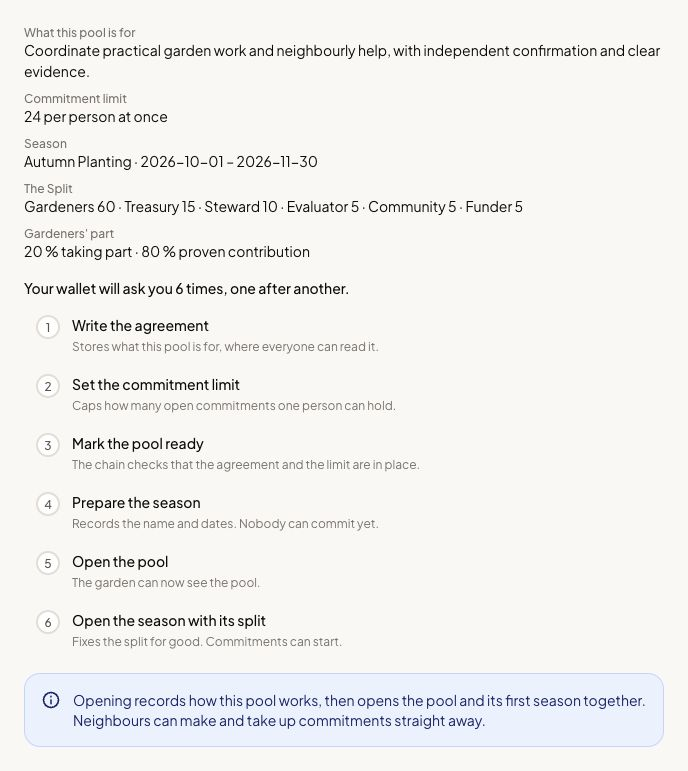
- Keep the flow open and follow its progress until the season is shown as open. Several changes may share one wallet prompt, or need separate prompts.
Use Pool Settings to change the agreement or commitment limit later. A save can contain more than one change. If it stops partway, the successful changes remain recorded; inspect the progress and current pool before retrying what remains.
How you know it worked
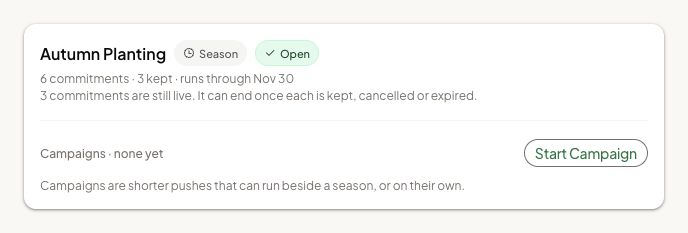
The pool and intended season show they are open, rather than merely prepared.
What happens next
Seed the promises people can take up. A season is the main period, with only one running at a time; a campaign is a focused effort that can run beside it or on its own.
If something goes wrong
If pool creation or season creation has an uncertain result, check the garden’s pool and season list before trying again. A pool that already exists does not need to be opened twice.
If a second season cannot open, finish the running season or use a campaign. If the pool is paused, read why; an authorized steward can use Resume Pool when appropriate.
For an app problem, open Settings → Support in the dashboard. On a phone, find Settings under Profile. Share the affected record's link.
Next step
Create the work and help that members can take up in this period.