Manage Garden Funding
A garden can hold money in two ways. This page explains both, shows what you can do with each from the dashboard, and is plain about what is not there yet. Everything here is in the Community workspace.
The two funds
| Shared fund | Endowment | |
|---|---|---|
| The dashboard calls it | Cookie Jar | Endowment, or vault |
| What it is for | Money the garden uses now: supplies, transport, thanking gardeners | Long-term support that is meant to stay in place |
| How money gets in | Donations from the public Fund page, deposits from the dashboard, and the garden's share of the endowment's earnings | Deposits from funders, who can take their deposit back out |
| How money gets out | Gardeners claim from it, up to a limit per claim | Funders request withdrawals of their deposits; eligible earnings are collected and split separately |
| Where it is | Community, Payouts tab | Community, Endowment tab |
Both are normally set up when the garden is created. If Payouts says No cookie jars found for this garden, or Endowment says No vault available yet, ask the Green Goods team.
Where promises fit
Commitment Pooling coordinates specific promises and their evidence. It is separate from the shared fund and endowment described here. The 2.0 release includes promises without new money rewards; it defers new promise payouts and settlement-account changes. Approving work or confirming a promise does not send money.
Before you start
- Be a steward or owner of the garden, and check that its name shows at the top left of the dashboard.
- Agree with your community what the shared fund is for. The app records every claim and does not judge it or check it against a work submission.
- Be online. Every change here is confirmed and saved straight away.
Look after the shared fund
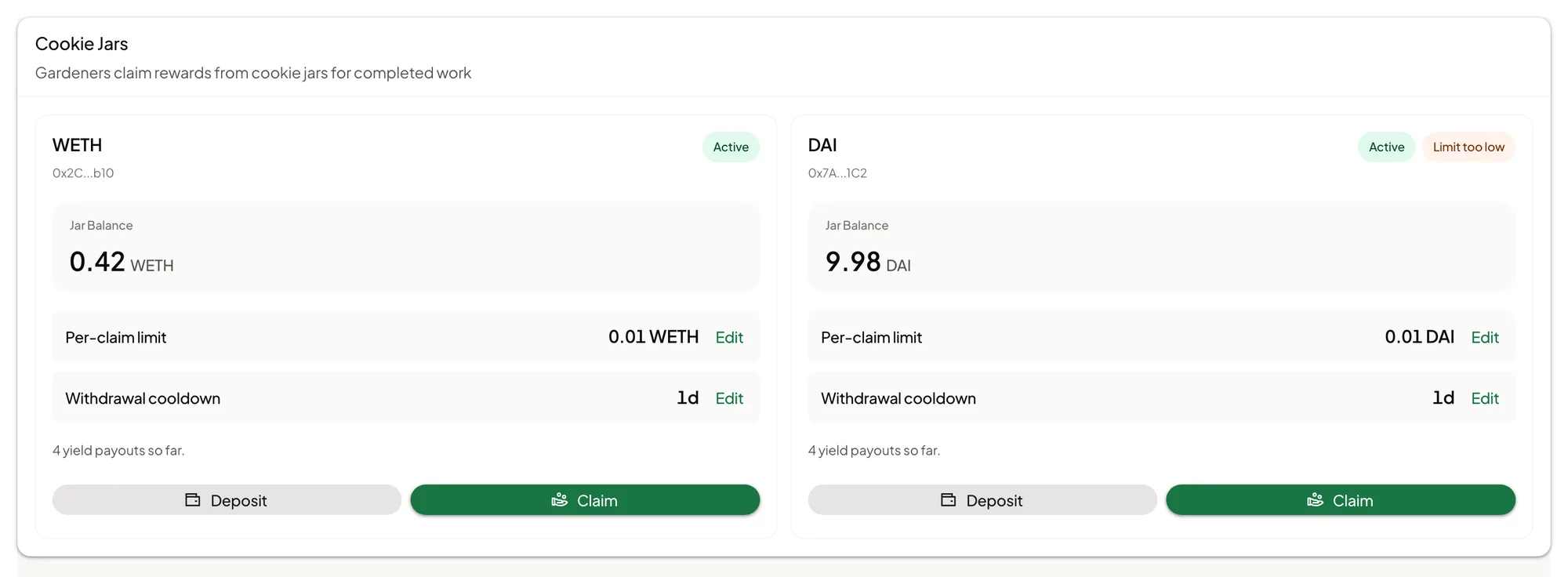
Open Community and choose the Payouts tab. The Cookie Jars card shows each jar's balance, its per-claim limit, and its cooldown.
How claims work
Any gardener in the garden can claim from the jar, in the app, up to the Per-claim limit, and then has to wait out the Withdrawal cooldown before claiming again. Each claim asks for a purpose, which is saved with it.
Two things follow, and your gardeners should hear them from you:
- A claim is not tied to approved work. The app does not check a claim against a submission. Your garden's own agreement does that.
- The limits are the only guard. Several gardeners can each claim up to the limit. Set the limit and the cooldown to match what the fund can afford.
Add money
- On the Cookie Jars card, tap Deposit.
- In Fund Cookie Jar, choose the jar and enter how much.
- Confirm. The money comes from the account you are signed in with.
Change the limit or the cooldown
- Next to Per-claim limit or Withdrawal cooldown, tap Edit.
- Enter the new value and tap Update Limit or Update Cooldown.
- Confirm.
These two settings can only be changed from the garden owner's wallet. If Edit is unavailable, the card says so and shows which account can do it.
Make a claim yourself
Stewards are gardeners too. Tap Claim, choose the jar, enter how much and the Purpose, and confirm. Hold yourself to the same agreement as everyone else. The purpose you write is public.
Look after the endowment
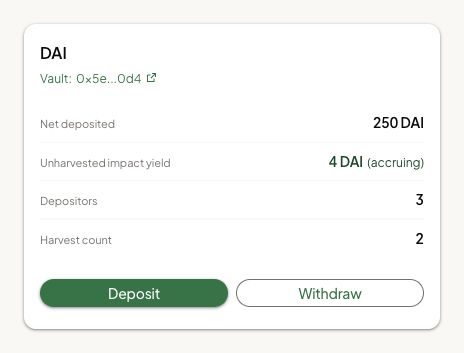
Open Community and choose the Endowment tab. There is one card for each kind of token the endowment holds. Each shows Net deposited, Unharvested impact yield, the number of Depositors, and the Harvest count.
Move the earnings to the garden
Only a steward or owner can collect earnings from the endowment. Once collected, anyone can trigger their distribution when its conditions are met. The dashboard offers both steps together; your garden does not control distribution timing exclusively. A deposit does not itself trigger either step.
- On the card, tap Harvest & Distribute. If a harvest was already done, the button reads Distribute Yield.
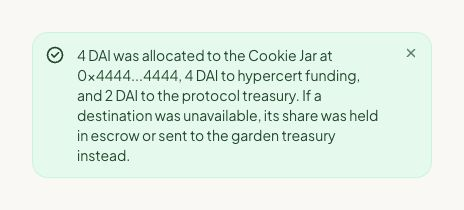
- Read Harvest and Distribute Yield. It shows the estimated total and how it will be split between the garden's cookie jar, certificate funding, and the protocol treasury.
- Confirm. It says whether it needs one confirmation or two.
- Wait for Yield distributed and read the reported amounts and destinations. A submitted transaction alone does not establish distribution.
Small amounts wait. If the card says an amount "is waiting until the minimum is reached", there is nothing to do yet.
The dashboard shows the split and has no control for changing it.
Deposit or withdraw your own money
Deposit and Withdraw on the card work on your own deposit, the same way they do for any funder. You cannot withdraw anyone else's.
Pause in an emergency
Emergency pause stops new deposits into the endowment. People who already deposited can still withdraw. Only the garden's owner can use it.
How you know it worked
- Deposit to the shared fund: the jar's balance goes up.
- Limit or cooldown: the card shows the new value.
- Collection: the Harvest count can go up while distribution is still waiting. This alone does not prove a payout.
- Distribution: Yield distributed shows the reported amounts and destinations. Check these rather than assuming every planned destination received its share.
What happens next
- After money reaches the shared fund, gardeners can claim it in the app, from Your Wallet, on the Cookies tab. Tell them it is there and remind them what it is for.
- After a confirmed distribution, the reported amounts reached their destinations. A destination that could not receive its share may have funds held for it or routed to the garden treasury; read the result. Collection alone can leave earnings waiting.
What is not here yet
Say these plainly when your community asks.
- Community voting on priorities. Green Goods has designed tools for members to signal what matters most. They are switched off in the dashboard today. Decide how to use your funds the way your community already decides things.
- Changing how earnings are split. There is no control for it.
- Creating or pausing a shared fund. A garden's jars are created with the garden.
- Paying a gardener when work is approved. Approval and payment are separate. Nothing is paid automatically.
Money promises to avoid
Funders and gardeners will ask you questions. These answers are safe because they match how the funds work:
- An endowment is not guaranteed. A funder can normally take their deposit back out, and the amount they get back can be less than they put in if the place the money is held loses value or is short of funds at that moment.
- A funder's deposit is not meant to grow. The earnings go to the garden, not to the funder.
- A donation is a gift. Green Goods has no way for a donor to take a donation back out of the shared fund.
- Green Goods does not promise a charitable receipt, nonprofit backing or a tax deduction. Explain any separate arrangement your garden offers directly.
If something goes wrong
| What you see | What to do |
|---|---|
| No cookie jars found for this garden | The garden has no shared fund. Ask the Green Goods team about adding one |
| Limit too low on a jar | The per-claim limit is too small to be useful. Raise it from the owner's wallet |
| Only the garden owner's wallet can change this jar | Sign in with the account shown, or ask the owner to make the change |
| Paused on a jar | Claims are stopped. Ask the Green Goods team, because the dashboard cannot resume a jar |
| Deposits disabled on the endowment | The endowment is not accepting deposits right now, usually because it was paused |
| Yield distribution is not available for this vault on this network | Earnings cannot be moved for this garden yet. Ask the Green Goods team |
| A harvest or distribution is still being checked | Use Check Status. Do not repeat a transaction while its outcome is uncertain |
| Yield harvested and waiting | The earnings have not reached the minimum for distribution. Wait for enough to build up |
| Distribution still pending with Retry Distribution | Collection completed; retry only the distribution using that button |
| Harvest did not complete with Retry Harvest | Retry using that button. If the message says new shares could not be registered, contact the Green Goods team instead; another harvest cannot recover them |
| Distribution confirmed, result unverified | Do not distribute again. Refresh after the balances update to see the outcome |
| A harvest or deposit does not show up | Give the records a moment before you try again. Do not repeat the action only because the screen is slow |
To reach the Green Goods team, ask in the Green Goods community on Discord.
Next step
That is every steward job. Go back to the list when you need the next one.