End a Season
End a completed season or campaign to preserve its shared result. Reconciliation and archiving are separate actions.

Before you start
- Sign in to the steward dashboard with access to the selected garden. Get steward access if needed.
- Check the garden name at the top left, then open Garden → Promises. Read the target before signing.
- Have a steady connection for setup and direct changes. New money-reward promises, settlement configuration and payouts are deferred.
- Check all commitments in the period. Passing the end date does not finish them.
- Decide whether the garden wants an impact certificate before considering archive.
Steps
- Check that every commitment in the season has finished. If the page says some are still live, follow those records first. The end date alone does not finish them.
- Choose End Season… or End Campaign…, check the named target, and confirm while online. The record becomes Reconciled and stops accepting commitments in that period.
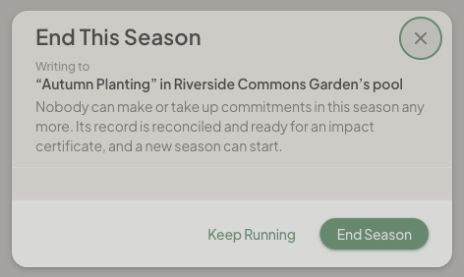
- Decide whether to keep the period available for future certification. The current dashboard cannot create a certificate linked to a pool season or campaign. If your garden wants that option, leave the period Reconciled and ask the Green Goods team before archiving.
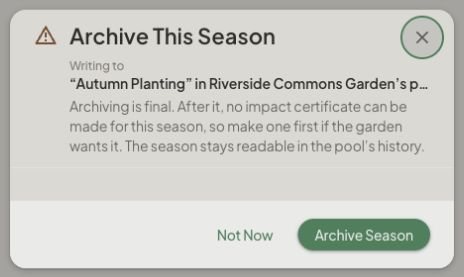
- If the garden has completed its review and does not need that option, consider Archive…. Read Archive This Season or Archive This Campaign before confirming. Archiving is final and prevents making a certificate from that cycle later; its history remains readable.
How you know it worked
The ended period reads Reconciled and stops accepting commitments. If you later archive it, its history remains readable but the archive decision is final.
What happens next
A reconciled period can stay readable without being archived. The separate Mint Impact Certificate form bundles approved work; it does not select or certify a pool cycle. Cycle-specific certification remains unavailable in the current dashboard. A kept promise or reconciled period is not a payout receipt.
If something goes wrong
If closing or archiving has an uncertain result, reload the season and check its state before acting again. Archive only after the required review is complete; it cannot be undone.
If live commitments remain, follow those records first. Do not open duplicate seasons to bypass the existing period. Money-reward and settlement operations remain deferred.
For an app problem, open Settings → Support in the dashboard. On a phone, find Settings under Profile. Share the affected record's link.
Next step
Check the remaining records before deciding whether another season is ready to end.