Steward Guide
A steward looks after a garden. You bring people in, make sure the right kinds of work can be recorded, review what gardeners submit, and look after the garden's shared funds. Your review is what turns a gardener's photos into a record other people can trust.
What you get:
- One place to run the garden. Members, submissions, assessments, and funds sit together in the steward dashboard.
- A clear queue. Work waits for you in one list, and nothing is approved without a person deciding.
- A record that outlasts you. Every decision is saved with your reason, so the next steward can see what happened and why.
Where you work
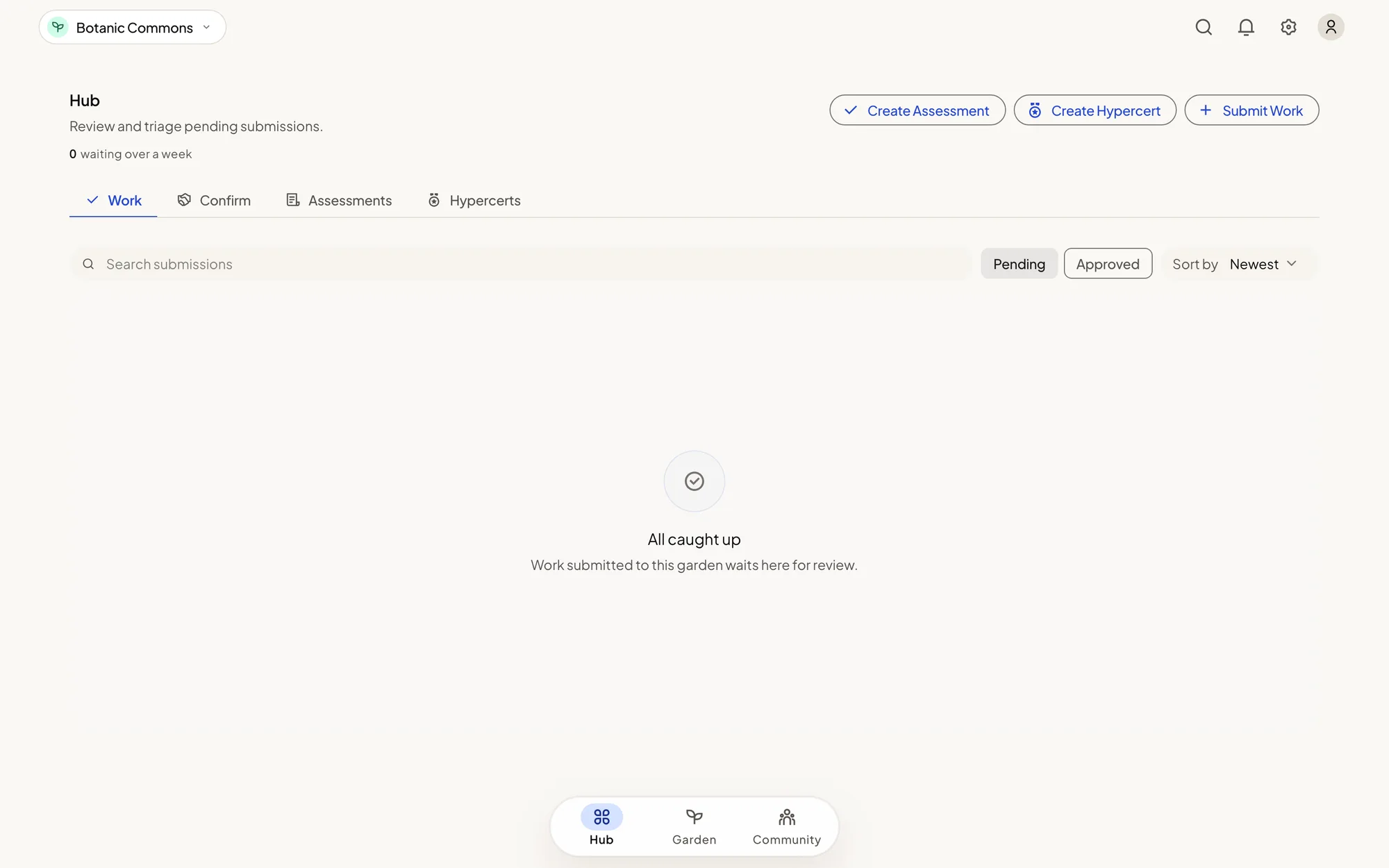
- The steward dashboard, at admin.greengoods.app. It is best on a computer. The bar at the bottom holds its workspaces: Hub for reviews and records, Garden for the garden's profile and health, and Community for members and funds.
- The Green Goods app, on your phone. You can review work there too, which helps when you are at the garden.
Before you change anything, look at the garden name at the top left of the dashboard. Everything you do applies to that garden.
Get steward access
You need access to at least one garden before the dashboard opens. There are two ways in: ask from inside the dashboard, or have someone who already runs the garden add you.
Before you start
- Use the account you use in the app. Access belongs to an account. A passkey account and a wallet are two different accounts.
- Know the garden's name, or have a link to it.
Steps
- Open admin.greengoods.app.
- Sign in. To use your passkey, tap Already have an account?, enter your account name, and tap Sign in with Passkey. To use a wallet, tap Connect Wallet. If you are new, tap Create Account.
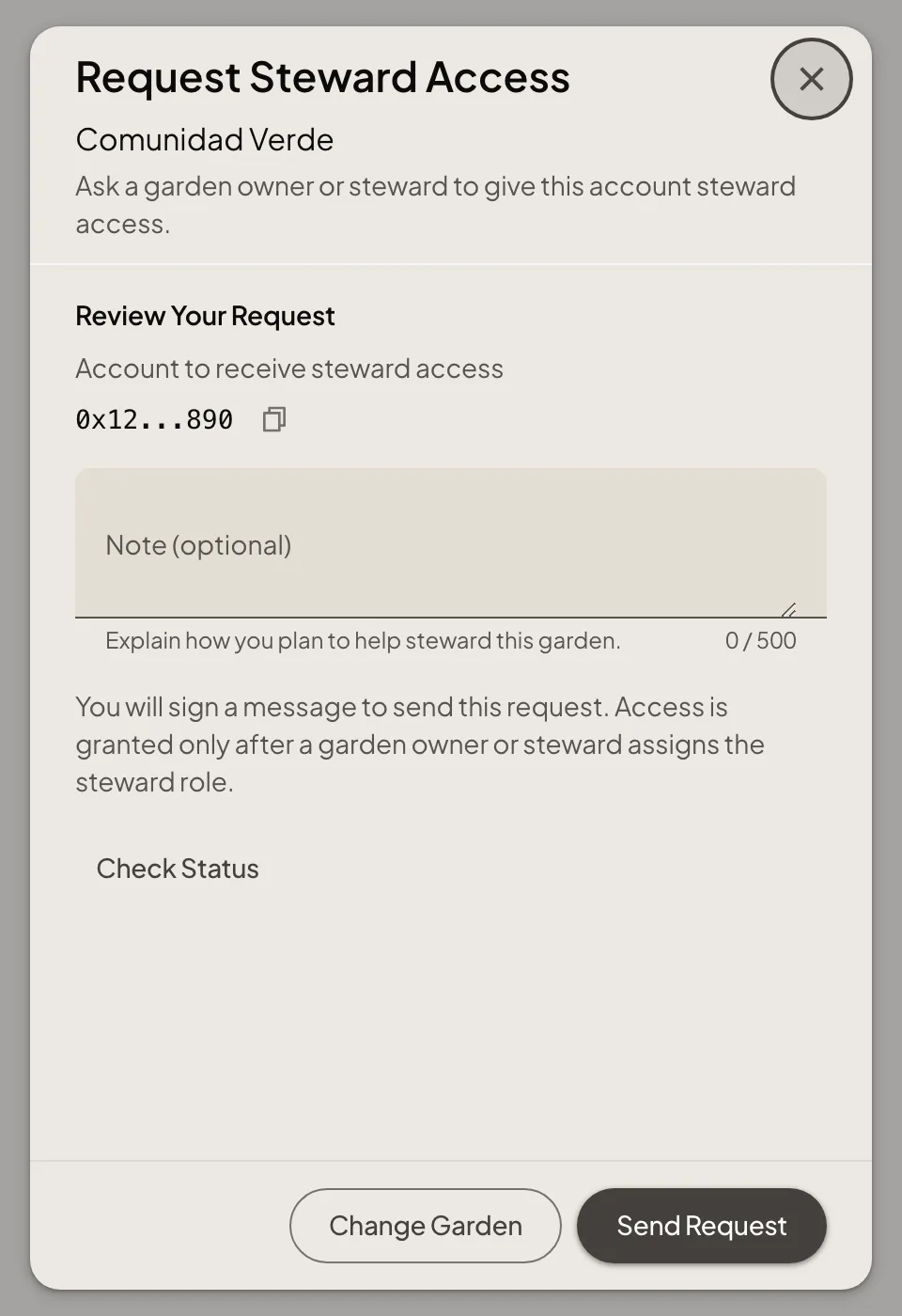
- On the No garden access yet screen, tap Request Steward Access.
- Search for the garden by name, or paste its link or address, and pick it.
- Under Review Your Request, add a short note about how you plan to help. It is optional, and it helps the person deciding.
- Tap Send Request and sign the message. This is a signature, not a payment.
Prefer to be added directly? Open your profile in the dashboard, copy your account address, and send it to a garden owner or steward. They can add you from Manage Members.
How you know it worked
The request shows Pending review. Tap View Steward Request at any time to see it, Check Status to refresh it, or Withdraw to cancel it.
What happens next
A garden owner or steward reviews your request in their dashboard and assigns the role. When they do, the request reads Steward access confirmed and the garden opens for you. Sending a request does not give access by itself.
If something goes wrong
| What you see | What to do |
|---|---|
| Steward requests are unavailable right now | Requests are switched off for the moment. Copy your account address from the same screen and send it to a garden owner or steward |
| Wallet required | You signed in with an email or social login, which the dashboard does not accept. Tap Sign Out & Connect Wallet, then use a passkey or a wallet |
| No steward request was found for this account and garden | You are signed in to a different account than the one you asked with. Sign in with that one |
| Request declined | Read the reason shown beside it. You can ask again when the garden allows a new request |
| The request may have been saved | Tap Check Status before you send another one |
| Can't load garden access | A temporary problem reading the gardens. Tap Try Again in a moment |
For what each role can do, see Roles in a garden.
Choose your next task
- Manage Members: bring people in, change roles, and answer requests.
- Make an Initial Assessment: record the starting point and goals.
- Review Work: check evidence and record your decision.
- Run a Commitment Pool: open the pool, seed promises without money rewards, and review participation and confirmation.
- Mint an Impact Certificate: bundle approved work into one claim.
- Manage Garden Funding: look after the shared fund and endowment.
Setting up a new garden
Create a Garden and maintaining the shared action list require deployer access. These setup guides are under Builders → Reference. Ordinary stewards can choose their garden's areas of work without maintaining that list.
If you signed in with a passkey, Green Goods covers the network fees. If you connected your own wallet, each change is a transaction you pay for on the Arbitrum network, so keep a little ETH there.
Promises
- Open a Pool and agree its rules.
- Seed Promises people can take up.
- Review Promises, participation, work counting and confirmation.
- End a Season before considering archive.
A garden starts with its people. Add your gardeners and fellow stewards, and decide who can join.