How It Works
Green Goods combines several innovations to make documenting and funding regenerative work practical for field workers. Here's how each piece works.
Local 1st Experience
Green Goods is built for the reality of field work – intermittent connectivity, mid-range devices, and diverse languages. Everything works locally first, then syncs when conditions allow.
Privacy & Security
Your data stays on your device until you choose to submit. Green Goods is passkey-first: if you use a passkey, authentication is tied to your device's secure enclave and your biometric data never leaves your phone. That flow creates a smart account for you without exposing private keys. If you connect a wallet instead, Green Goods uses the wallet address you already control.
Passkey First, Wallet Available
Green Goods is designed so new users can get started without seed phrases, but it still supports direct wallet access for experienced users:
- Passkey authentication – Sign in with your fingerprint, face, or device PIN. This is the smoothest onboarding path and creates a smart account for you automatically.
- Wallet connection – Connect an existing wallet (MetaMask, Rainbow, WalletConnect-compatible wallets) if you want to sign directly with your own address.
What changes depending on sign-in method:
- Passkey users usually get the simplest flow, including sponsored transactions where that path is supported.
- Wallet users keep direct signer control, but some actions require normal on-chain gas fees.
- Address continuity matters either way: your roles, work history, and reputation follow the address you keep using.
Your contribution history, roles, and reputation are tied to the address you keep using. If you switch from one sign-in path to a different address later, that new address will not automatically inherit the old one’s history.
Works In All Conditions
Green Goods is a Progressive Web App – it works like a native app on your phone, even in low-connectivity environments:
- Install from your browser – Tap "Add to Home Screen" on any mobile browser. No app store required.
- Offline-first – All submissions are saved locally before syncing. The service worker caches the app shell and critical assets.
- Background sync – When you come back online, queued submissions sync automatically with exponential backoff and retry logic.
- Mobile optimized – Designed for mid-range Android devices with limited bandwidth. Touch targets, image compression, and lazy loading keep the experience fast.
Supports English, Spanish & Portuguese Currently
Full UI support across three languages with more coming:
| Tier | Languages | Status | Coverage |
|---|---|---|---|
| Tier 1 | English, Portuguese, Spanish | Active | Full UI, all action schemas, documentation |
Additional languages, including French, are under consideration. Language detection follows your device settings, with manual override available. Action titles, descriptions, instructions, and form labels are all translated. Translation files are open for community contributions.
MDR Workflow (Media → Details → Review)
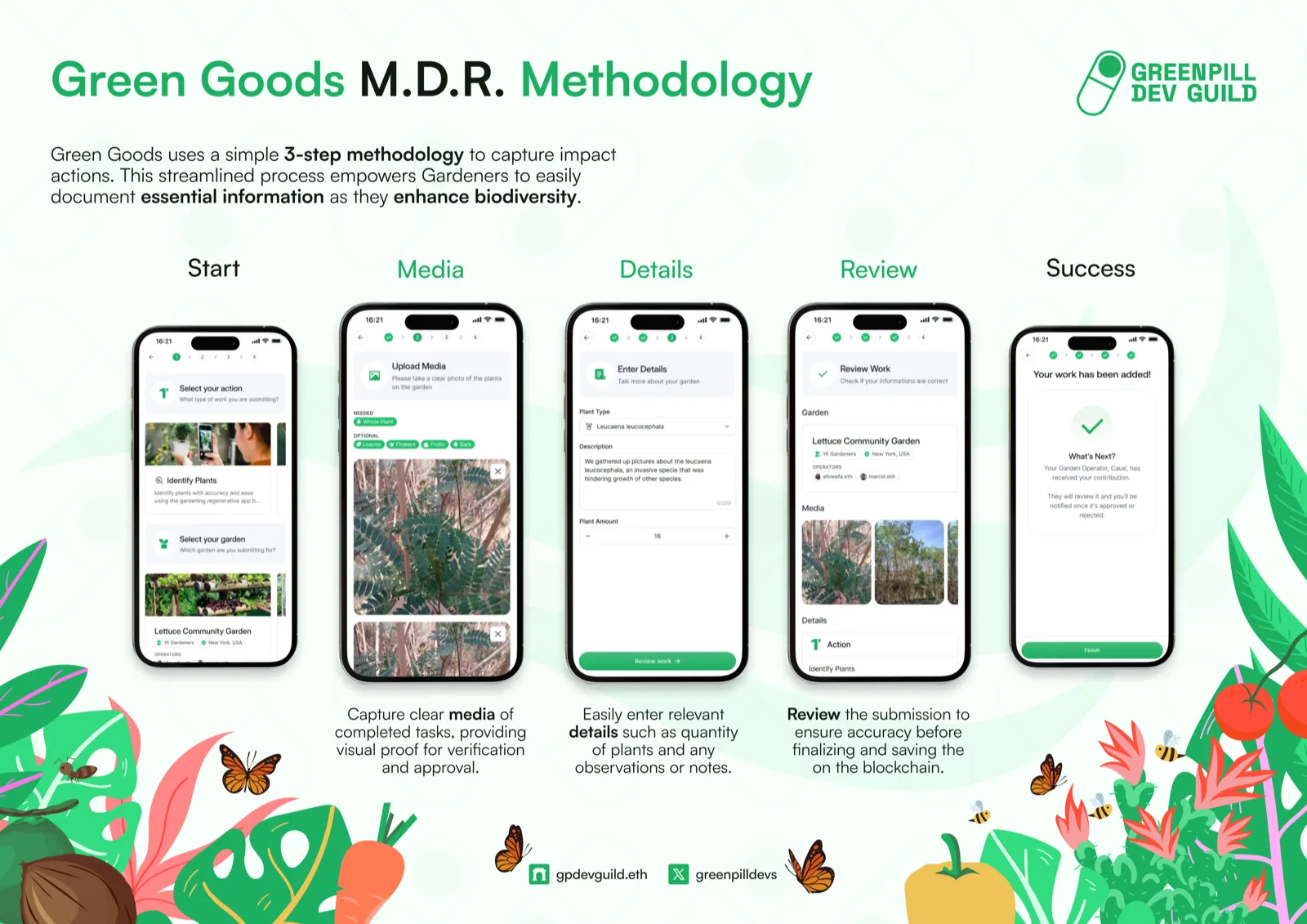
The MDR workflow is how every piece of work gets documented. It's designed for mobile phones in the field, mirroring the simplicity of posting to social media.
Capture Photos, Videos & Audio
Step 1: Media – Open the camera and capture photos of your work. The action specifies minimum and maximum media requirements (e.g., "at least 2 photos of the planted trees"). Photos are stored locally on your device first, then uploaded to IPFS when you submit.
Provide Action Specific Details
Step 2: Details – Fill in action-specific form fields. These are generated from the action's configuration and can include:
- Text inputs (descriptions, notes)
- Number fields (tree count, kg collected, kWh generated)
- Dropdowns (species selection, waste category)
- Sliders (confidence rating, quality assessment)
- Repeating rows (multiple observations in one session)
Each action follows the Common Impact Data Standard (CIDS) framework (Activity → Output → Outcome → Impact), ensuring that the details you provide connect to verifiable outcomes:
| CIDS Stage | What You Provide | Example |
|---|---|---|
| Activity | What you did | "Planted trees in zone A" |
| Output | Direct product | "12 mango trees, geotagged" |
| Outcome | Change produced | "15% canopy cover increase" |
| Impact | Long-term effect | "Carbon sequestration, food security" |
Review Before Uploading
Step 3: Review – See a summary of your photos and answers. Add optional feedback or notes, then submit. The submission enters the operator's review queue.
The full step-by-step:
- Open the app and navigate to your garden
- Browse available actions – Each action card shows the title, domain badge, description, and requirements
- Select an action to start the MDR workflow
- Capture media – Take photos using your device camera or select from your gallery
- Fill in details – Complete the action-specific form fields
- Review and submit – Check your submission summary and tap submit
- Track progress – Monitor your submission status in the work dashboard (pending, approved, or changes requested)
Impact Reporting & Verification
Every approved piece of work creates a verifiable on-chain record that builds into a complete impact story.
Capturing & Proving Impact
The attestation chain creates an unbroken trail from field work to certified impact:
Each step is recorded on the Ethereum Attestation Service (EAS) with schema-validated data. Smart contract resolvers enforce that attesters have the correct Hats Protocol role and that the data matches the expected schema.
Build Trust & Transparency
- Permanent records – Every attestation is on-chain and immutable. Your work history is verifiable by anyone, forever.
- Portable reputation – Your attestation history travels with you across gardens and platforms. Consistent, quality work builds an on-chain reputation.
- Auditable governance – Roles, permissions, and decisions are on-chain. Any community member can verify who approved what.
A Full Repeatable Cycle
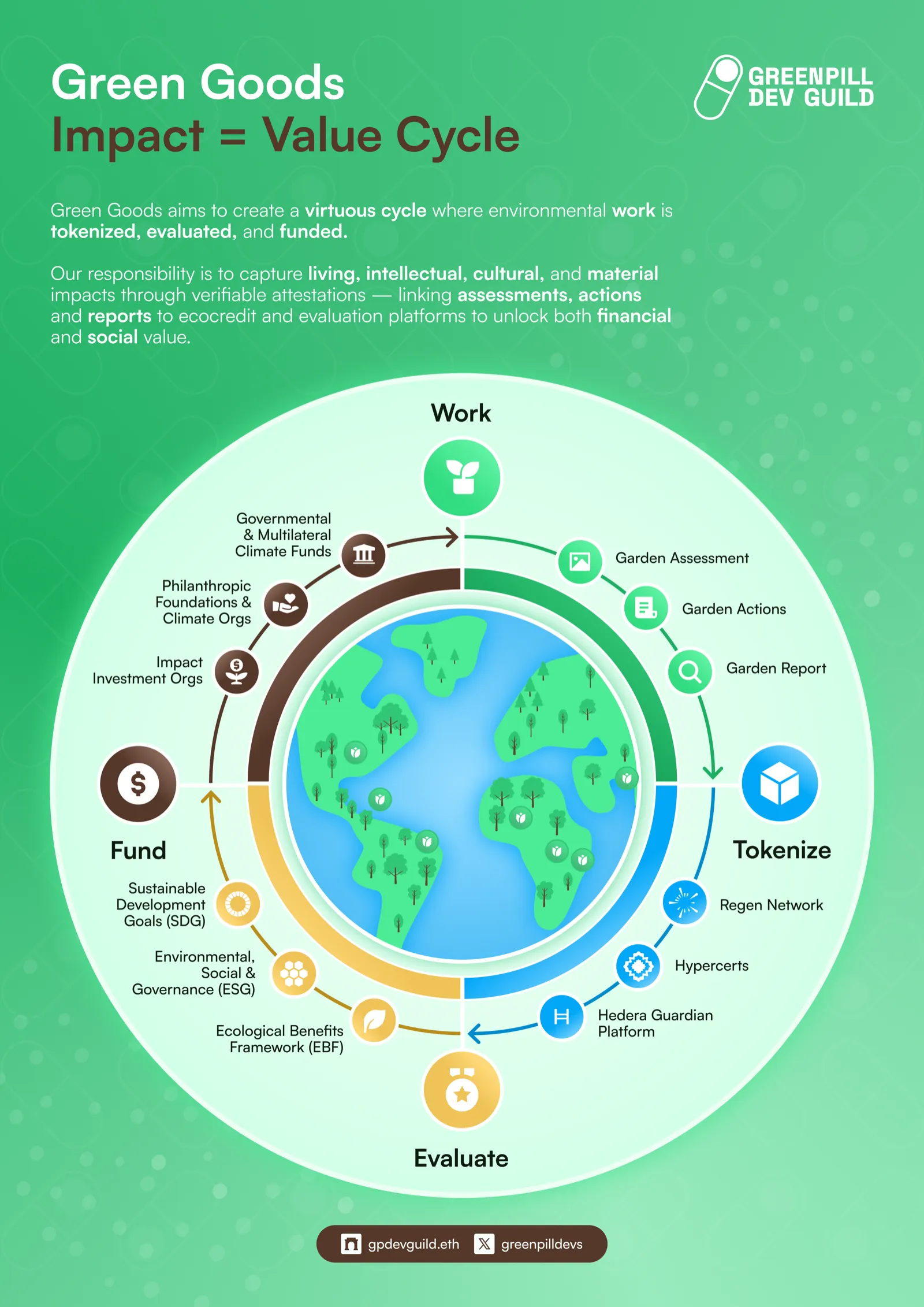
The impact cycle is designed to be self-reinforcing:
- Gardeners document work → creates activity records
- Operators verify and approve → creates on-chain attestations
- Evaluators assess and certify impact → Operators create Hypercerts
- Funders purchase Hypercerts and deposit in vaults → capital flows back to the community
- Community uses funding to enable more work → cycle repeats
Each cycle strengthens the next: more verified impact attracts more funding, which enables more work, which produces more verified impact. Green Goods is the infrastructure that makes this flywheel turn.
Hub To Manage Gardens
The admin canvas gives operators full visibility and control over their garden community.
Manage Gardeners & Operations
Operators spend 2-4 hours per week on garden management. The canvas streamlines their core workflows:
- Work review queue – See all pending submissions, approve or request changes with one tap
- Action management – Configure which actions are available, set media requirements, define form fields
- Role management – Add gardeners, promote contributors, assign evaluator roles via Hats Protocol
- Garden health – At-a-glance dashboard showing work volume, approval rates, and capital measurements
Build Relationships With Evaluators & Funders
The admin canvas is the bridge between field operations and impact certification:
- Assessment creation – Operators initiate assessments that evaluators complete
- Hypercert minting – Package verified work into tokenized impact certificates
- Vault management – Monitor deposits, trigger harvests, configure yield splits
- Impact reporting – Export reports in formats funders expect via Karma GAP integration
Engage The Community
Community governance tools built into the dashboard:
- Conviction voting through Gardens V2 signal pools
- Cookie Jar management for petty cash operations
- Community proposals for resource allocation
- ENS subdomains for human-readable garden identities
Next page
Next: Why We Build
Now that you understand how the platform works, learn about the mission and ecosystem that drives Green Goods.
Why We Build