Track Your Work
Your Work is the one place that shows everything you have recorded: what is still on your phone, what is with your steward, and what they decided. This page explains each status, what an approval means, and what to do when work comes back.
Before you start
- Open the installed app, signed in to the account you submit with.
- You do not need a signal to look. The list shows what was saved the last time you were online.
Steps
1. Open Your Work
- Open Home.
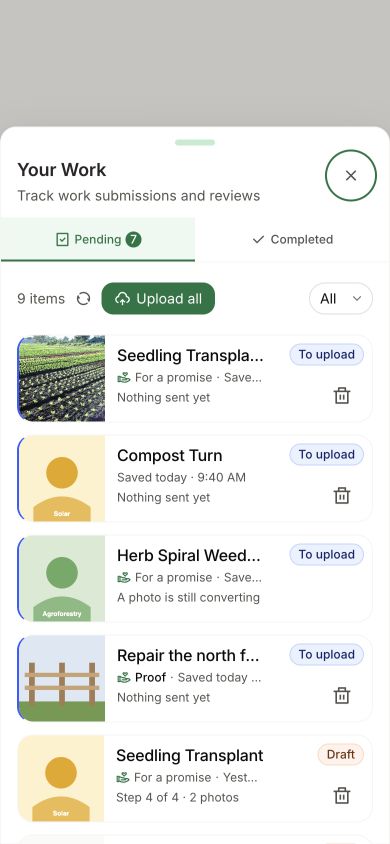
- Tap the Your Work button at the top. It shows a number while anything is still on your phone.
There are two tabs. Pending holds everything that is not decided yet. Completed holds work a steward has reviewed.
2. Read the status
On the Pending tab, each item carries a label.
| Label | What it means and who acts next |
|---|---|
| Draft | Saved on your phone, unfinished. Tap it to continue |
| To upload | The work record is ready to send. Tap Upload all when you have a signal |
| Checking | The app is checking whether the record arrived. Wait; do not submit a duplicate |
| Can't upload | The record cannot be sent as it is. Open it to see why |
| Didn't upload | A try failed. Open it and tap Upload now |
| In review | The record arrived. A steward acts next |
Checking means the outcome is still uncertain; do not assume the work failed or submit a duplicate. In review means your steward can review it. Recover Unsent Work covers each of those labels.
These labels describe the work record. Queued photos and details may already have been prepared in public storage before the record is sent. The privacy answers explain what becomes public.
3. See the decision
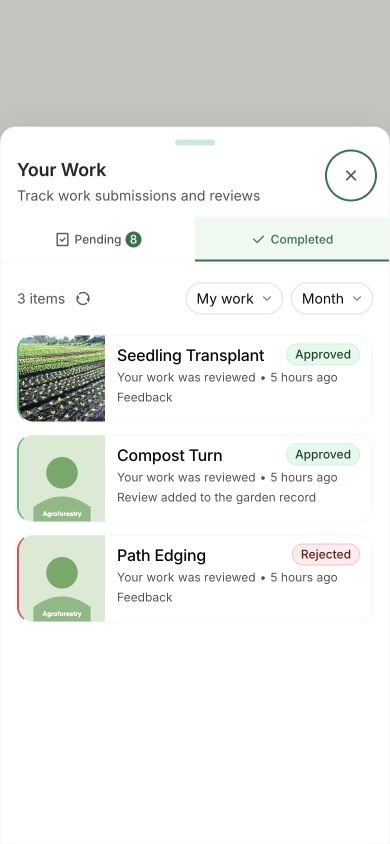
- Tap the Completed tab. Reviewed work is marked Approved or Rejected.
- Tap an item to open it.
- Read Review feedback. It is what your steward wrote to you.
The Completed tab starts on the last month. If you are looking for something older, change the time filter to Year.
If you also review other people's work, choose My work in the Completed filter to see the decisions on your own submissions.
How you know it worked
- Approved: the item is on the Completed tab, marked Approved. Its page says Your submission has been approved.
- Rejected: the item is marked Rejected, and its page says Not yet approved, with the steward's reason under Review feedback.
What happens next
While it is in review
A steward of your garden looks at your photos and details and compares them with what the action asks for. Green Goods does not send an alert when they decide, so check Your Work now and then.
There is no fixed review time. It depends on your stewards. Two things help:
- Tell your steward when you have submitted something, in the chat your garden already uses.
- Do not wait until an action is about to close. A steward can only decide while the action is still open. If your work is still In review as the end date gets close, remind them.
If it is approved
An approval is your steward's signed decision that the work happened as you described it. It is a separate record, linked to yours, with their feedback and how confident they are.
What approval brings:
- A public record. Approved work appears on your garden's page on the public website, with its photos, your description, and your account's name if it has one.
- Proof that travels. The work and the approval stay readable outside Green Goods. On the work's page, under Actions, tap View Certificate to open the public record.
- A place in your garden's story. Approved work is what a garden can later bundle into an impact certificate and show to funders.
What approval does not do:
- It does not pay you by itself. No payment is attached to an approval.
- It does not measure the outcome. It records a steward's review of your evidence. It is not a scientific measurement of what changed.
Work for a promise
If your work contributes to a promise, open that promise from the garden's Promises tab. Linked means the work is attached to it. Approved means a steward reviewed the work. Counted toward this promise means that approval reached its requirement. If approved work is still waiting to be counted, ask your steward to check the existing record; do not upload a duplicate.
Once the required work is counted, the eligible confirmer acts next. Confirmation that the promise was kept is separate from work approval and from payment. The promise guide covers both garden-work and other-proof paths.
How gardeners get rewarded
Rewards are separate from approval, and each garden decides how to use them.
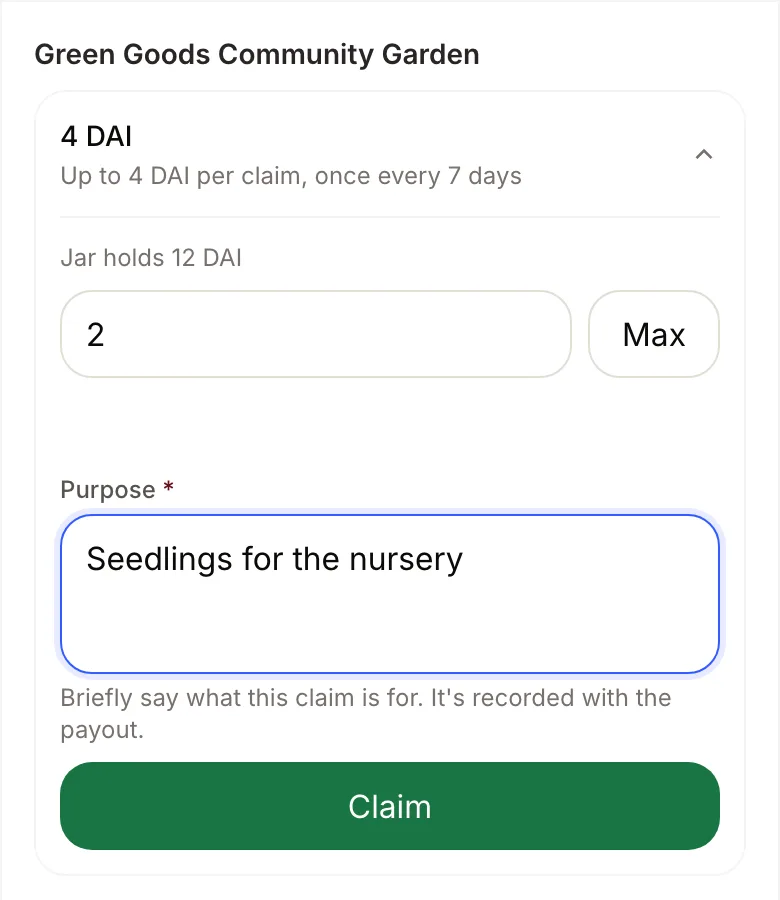
The garden's shared fund. If your garden has a cookie jar with money in it, gardeners can claim from it. Ask your steward what the jar is meant for before you claim. The example amounts below are not promised rewards for approved work.
- Open Home, tap the wallet button at the top to open Your Wallet, and choose Cookies.
- Read the jar's limit per claim and how often you can claim.
- Enter an amount and say what it is for under Purpose. The purpose is recorded with the payout.
- Tap Claim and confirm when asked.
If Cookies says No cookie jars yet, your garden has no jar you can claim from. Your steward can tell you whether one is planned.
Badges. Open Profile, then Badges. First Work can be claimed after your first submitted work.
If it is rejected
A rejection is a decision about that one record. It is not a judgment of you, and it is the most useful feedback you will get.
- Read Review feedback on the work's page.
- Fix exactly what it names: a clearer photo, a missing number, a different action.
- Submit the work again as a new submission. The rejected one stays in Completed and cannot be edited.
If the feedback is unclear, ask your steward before you resubmit.
If something goes wrong
| What you see | What to do |
|---|---|
| Your work is not in Pending or Completed | Check that you are signed in to the account you submitted with. Then set the Completed time filter to Year |
| It has been In review for a long time | Message your steward. If the action has ended, they can no longer decide on it, and you will need to submit under an action that is open |
| The label is Checking and will not change | Leave it. The app is making sure it arrived, and it checks again when you are online. Do not submit it again |
| Approved, but you expected a payment | Approval does not pay by itself. See How gardeners get rewarded |
| The list looks out of date | Tap the refresh button next to Upload all. It needs a signal |
To reach the community, ask in Discord.
Next step
If anything is still marked Draft, To upload, Can't upload, or Didn't upload, it has not reached your steward yet.