Confirm a Promise
Confirm that the agreed help happened after checking its evidence. This is separate from approving a work submission or making a payment.

Before you start
- Sign in with the account that joined this garden. Visitors can read records; taking part requires membership.
- Check that the garden has an open pool. New money rewards and promise payouts are deferred.
- Photos and details can become public before you send the work record. Use your own evidence and read the privacy guidance.
- Be an eligible confirmer named by the agreement. The provider and contributing team cannot confirm their own promise, even through a steward fallback.
- Check the required confirmation count. Your confirmation cannot be taken back.
Steps
- The eligible confirmer opens the promise and checks the evidence. The action is Confirm It Was Kept; the review may ask Did the help arrive? or Was the work you asked for done?
- Your confirmation cannot be taken back, and it may be only part of a group's required total. Read the confirmation count and check the evidence before choosing the button shown: Confirm It Was Kept, Confirm the Help Arrived, or Confirm the Work Was Done.
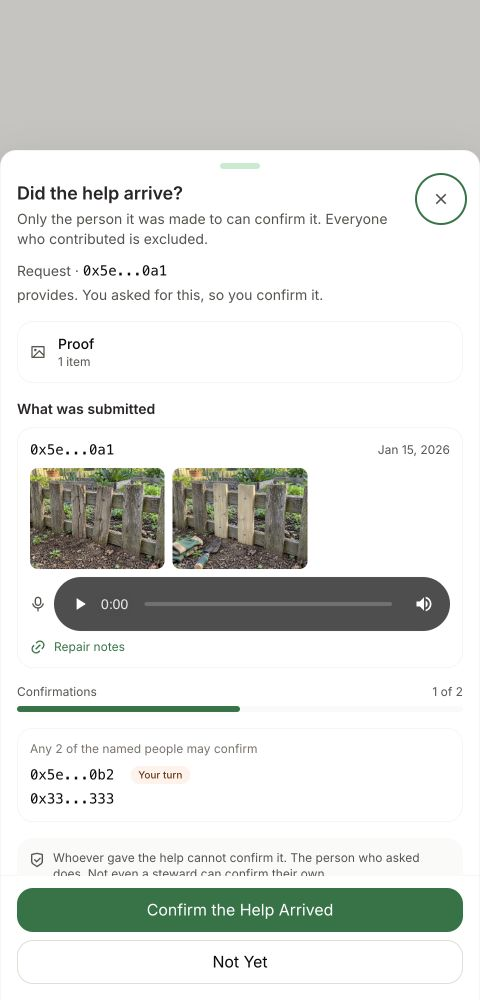
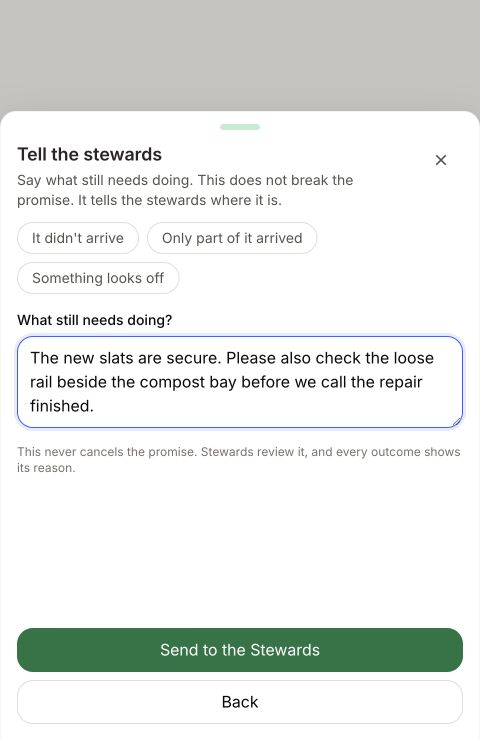
- If the help is not ready to be called kept, choose Not Yet when offered. Write what still needs doing, then choose Send to the Stewards while online. Once it arrives, the promise reads Under review by stewards and ordinary confirmation stops until the review is resolved. It does not cancel the promise.
Opening Not Yet or saving its explanation does not send it. If sending fails, the explanation stays on this phone and the promise stays ready to confirm. Read its current status before using Try Again; ask your steward if the outcome is uncertain.
How you know it worked
The confirmation count increases once your decision reaches the shared record. The promise reads Kept once the required total is met.
What happens next
If more confirmations are required, the remaining eligible people act next. A successful Not Yet send moves the promise to Under review by stewards; ordinary confirmation pauses until that review is resolved.
If something goes wrong
If no confirmation action appears, check whose turn it is, your account, team membership and the current state. Opening or saving a Not Yet explanation does not send it. After a failed send, keep the explanation on this phone and check the record before Try Again.
After an uncertain confirmation, check the count and history before acting again. A confirmation that already reached the record cannot be taken back. See Recover Unsent Work for saved explanations and other queued actions.
Ask your steward about the agreement or record. For an app problem, open Profile → Help.
Next step
Follow any work submissions separately from the promise’s confirmation.