Donate to a Garden
A donation is a gift to one garden. It goes into that garden's shared fund, where the garden can use it right away for things like supplies, transport, and thanking the people who did the work.
Before you start
- A crypto wallet, with DAI or WETH on the Arbitrum network and a little ETH there for the network fee. The page does not take cards, and it does not convert other tokens for you.
- A garden you want to support. Read its approved work first, on its page at greengoods.app/gardens.
- Be sure. A donation is a gift. Green Goods has no way to send it back to you.
Steps
- Open greengoods.app/fund.
- Under Find a Garden to support, find the garden.
- Tap Donate on its row. A window opens titled Donate to, with the garden's name.
- Enter the Amount, in dollars.
- Under Payment currency, choose the token to pay with, usually DAI or WETH. If you choose WETH, the window shows roughly how much WETH that is at the current price.
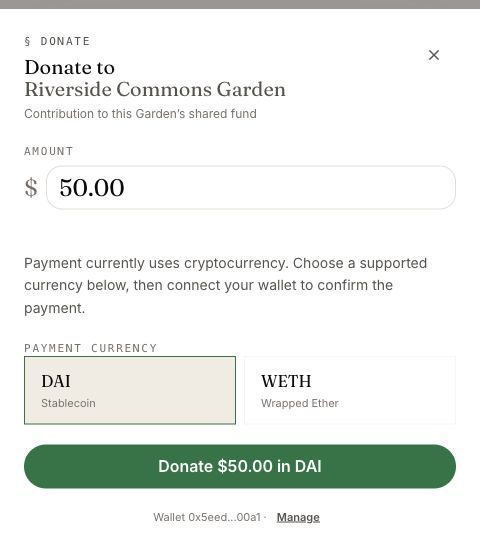
- Tap Connect Wallet if your wallet is not connected yet.
- Tap the button that reads Donate, your amount, and the token, then confirm in your wallet. The first time you use a token, your wallet asks twice: once to allow the token to be spent, and once for the donation itself.
You can also start from a garden's own page. Support This Garden takes you to the Fund page with that garden picked out.
How you know it worked
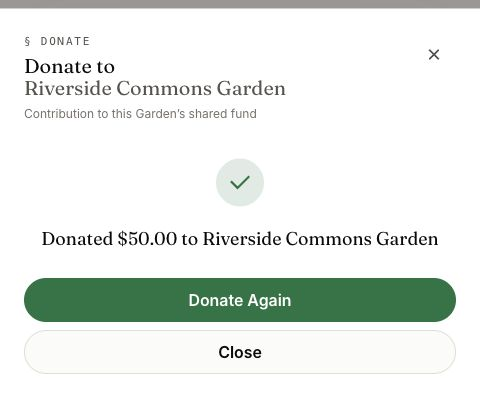
- The window says Donated, with your amount and the garden's name.
- Your wallet's history shows the transaction on Arbitrum.
Tap Donate Again to give more, or Close.
What happens next
The money is now in the garden's shared fund. From here, the garden acts.
- Who can use it: the garden's gardeners. Each can claim up to a limit, then has to wait before claiming again. The garden sets the limit and the wait.
- What it is for: the garden decides. Each claim is saved with the reason the gardener gave. Green Goods does not check a claim against a piece of approved work.
- What you can see: the garden's public page shows its approved work. It is the best view of what your support is helping to happen.
If something goes wrong
| What you see | What to do |
|---|---|
| This garden has no donation fund configured yet | This garden cannot take donations here yet. Choose another garden, or contact the garden |
| We couldn't load payment options for this garden | A temporary problem. Close the window and try again |
| The live ETH price isn't reaching us on this network | The page cannot price WETH right now. Choose DAI, or try later |
| Enter an amount on the button | Type an amount first |
| Transaction canceled | You closed the wallet's confirmation. Nothing was sent |
| Transaction failed | Read the message under it. The usual causes are not enough of the token, or not enough ETH for the fee |
| The garden is not on the Fund page | Gardens appear there after their first approved work |
For anything else, ask in the Green Goods community on Discord.
A donation through Green Goods supports the garden directly. Green Goods does not promise a charitable receipt, nonprofit backing or a tax deduction. Ask the garden about any separate arrangement.
Next step
If you would rather keep your deposit and give the garden its earnings over time, look at an endowment.