Product Experience QA
Product-experience QA asks the one question the test suite cannot: can a real person understand, complete, recover from, and trust this flow? Passing builds prove the code runs; a QA walk proves the experience works. Anyone on the team can take one — if you can open the app and describe honestly what you saw, you are qualified.
Where QA happens
Walks are recorded in the QA app, a shared checklist where each tester signs in with their wallet and owns their own verdicts. Every test case gets a Pass, Fail, Blocked, or N/A call and a short note, saved as you go. Use Blocked when a required path cannot complete; use N/A only when a case is intentionally outside the agreed scope:
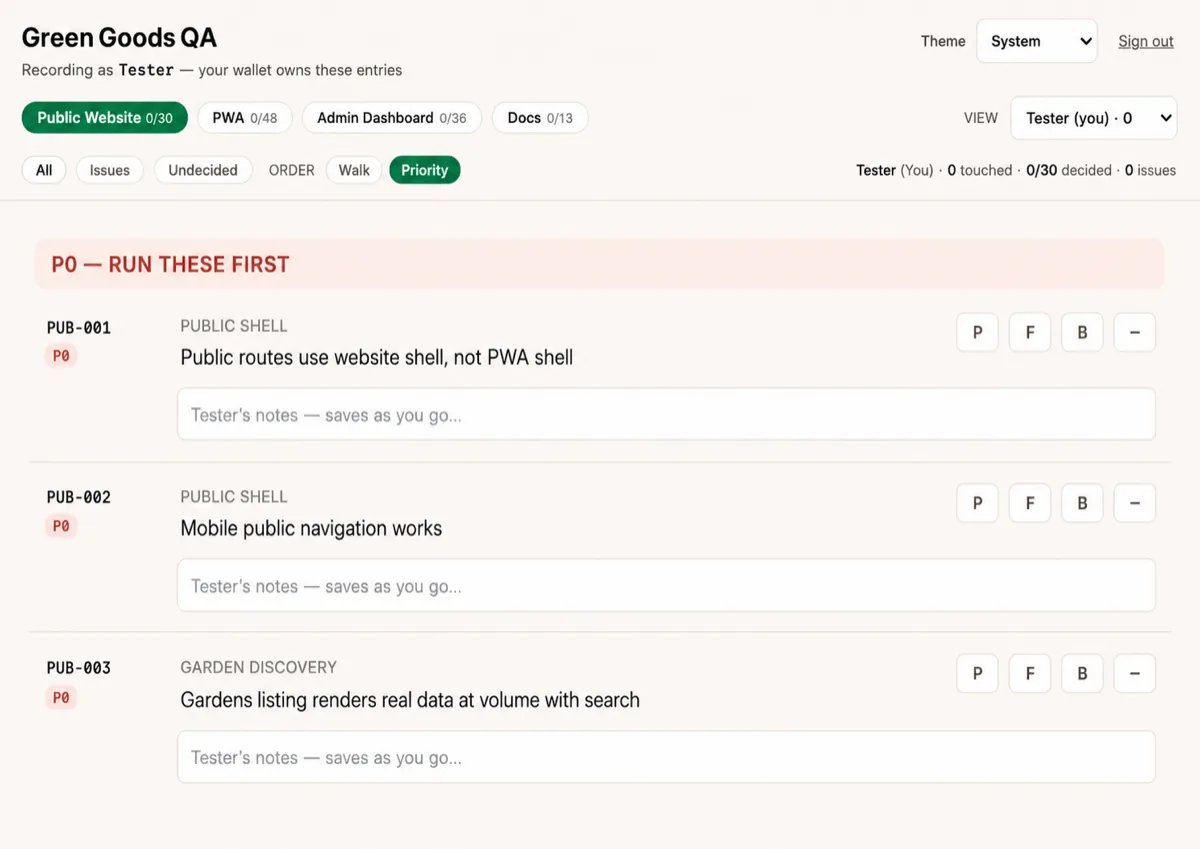
Two more places complete the picture:
- The QA app orders cases by priority or area. Test Cases is the public catalog behind it, adding each scenario's kind, area, and expected evidence — and how cases are added, changed, and retired.
- Findings land in Linear after the call, while screenshots and recordings go to the private Drive QA folder. Linear, Drive, and staging links are shared in the private session charter rather than published here.
Take PUB-001, the simplest P0 on the sheet. Open
greengoods.app in a desktop browser and visit /, /gardens, /fund,
/impact, /actions, and /cookies. Every page should show the website header and no app-style
bottom navigation. Record Pass with a one-line note, or Fail naming the route that looked
like the installed app instead. The walk itself needs no wallet or product role; recording the
verdict still needs your allowlisted wallet signed in to the QA app.
Walking a flow
However you enter a session — on a call, solo, or paired with an agent — the loop is the same:
- Walk the real surface with the intended identity and environment.
- Capture each observation before diagnosing it.
- Reproduce visible defects from the rendered surface inward.
- Fix only bounded, reversible work that fits the agreed session scope.
- Revalidate in the same surface and record the remaining risk.
- Hand deferred findings to the agent-run QA triage workflow —
qa-triage, or theqa-call-reportroutine after a call — which files them in Linear as fix slices.
The QA session
A team session is a scheduled call where two or more people walk different surfaces at the same time, recording as they go. The QA app is the shared checklist; this page is what to read before opening it.
Before the call
- Confirm every tester's wallet is on the QA app allowlist and each person can sign in once — a five-minute smoke the day before saves twenty minutes of call time.
- Pick the scope and split the surfaces. Walk priority-first (P0s before P1s), and where possible each person tests surfaces they did not build.
- Agree the write boundary up front: which funding and on-chain flows run end to end with real transactions, and which stop at the review step. The catalog's Transaction kind marks the cases this decision touches.
- If test cases changed since the last deploy, redeploy the QA app first — a deployment pins the catalog revision it shipped with.
During the call
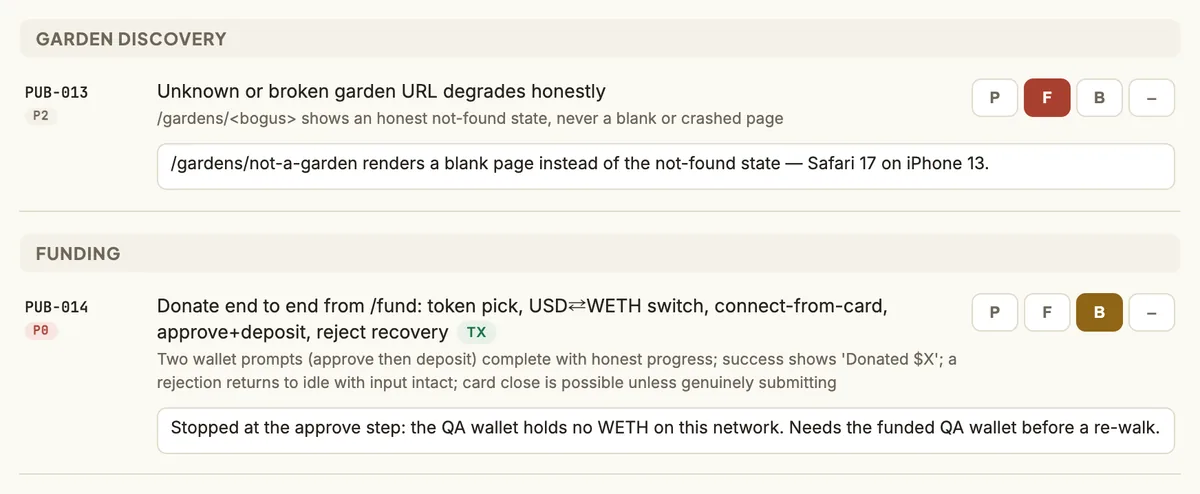
- Record a verdict and a short note per test case in the QA app as you walk. Screenshots and recordings go to the private Drive QA folder, never into public artifacts.
- The meeting notes capture the discussion on their own; nobody takes minutes. Spend the last half hour walking the merged fail list together and aligning on the cross-surface calls — those decisions are the most valuable output of the call.
After the call
- Before everyone drops, spend five minutes on four questions: What did we cover, and what did we consciously skip? What worked well enough to leave alone? Which fails worry us most? Would we welcome a new garden onto this build tomorrow?
- Trigger the
qa-call-reportroutine (or run/qa-triage --callat a desk). It pulls every tester's verdicts from the QA app (qa:pullmerges every shard ever written, so the pulled entries are then filtered to the call window by their timestamps), finds the call's Gemini notes in Drive, joins the two by Test ID, and clusters failures into at most eight fix slices — each sized for one branch and one PR. - It then enriches without blocking: the Vercel deploys live during the call, so every slice names
the build under test; PostHog exceptions from the same window, per surface; and Sentry issues
when that connector is wired. Finally it writes one
QA session YYYY-MM-DDparent issue (a second call on the same day appends· 2) plus slice sub-issues to Linear — deduplicated against open QA issues and privacy-swept: no tester attribution, wallets, or replay links anywhere, while slices keep redacted case-level evidence — and posts a one-message aggregate summary to #product on Discord. - Fix sessions then work slice by slice. Every fix is a repair grounded in the feature's history and existing structure — updating or removing code before adding any — and is done when the slice's test cases pass again.
- Re-QA later in the week is a scoped walk of the affected cases. Whoever recorded a fail re-records the pass, replacing their current verdict. The standing result remains the most severe current verdict across testers, so someone else's pass cannot clear another tester's fail or blocked result.
The parent issue is titled QA session YYYY-MM-DD ( · 2 appended for a second call on the
same day) and follows one template, so every session reads the same way:
<Two or three sentences a teammate would write: what was walked, by how
many testers, on which surfaces, and the headline.>

Build under test: client `<sha>` · admin `<sha>`

## Results by priority
- P0: <walked>/<total> — <pass> pass · <fail> fail · <blocked> blocked · <na> n/a · <noted> noted only
- P1: <walked>/<total> — …
- P2: <walked>/<total> — …

## Decisions from the call
- <one ruling per line — drop the section when the call made none>

## Slices
- <one line per slice: what it covers and its Test IDs>
- already tracked: <existing issue> — <one line>

## Not sliced
- <note-only follow-ups and anything past the slice cap, one line each — drop the section when empty>

**Done when**
- every slice — and every related already-tracked issue — is Done or explicitly deferred, and
  the re-QA walk has re-recorded its Test IDs

Session <slug>. [Meeting notes](<drive-url>) — or "App-only run — no meeting notes found."
What every journey must prove
- The entrypoint, role, and selected Garden are clear; a wallet on the wrong network is told so and pointed to the fix.
- Loading, empty, disabled, error, offline, and recovery states are usable.
- A visible interaction changes state and provides legible feedback.
- Keyboard, focus, labels, touch targets, contrast, and reduced motion remain accessible.
- Saved-offline, pending-confirmation, and confirmed states look different and say which one you are in.
- Private identities, wallets, session data, and defect evidence stay out of public artifacts.
Ownership and related pages
The generated test-case catalog owns public scenario definitions only.
.claude/context/qa.md owns recording, attribution, privacy, result rollup, and artifact
locations; the QA skills own session and triage mechanics.
- Test Cases — every scenario, grouped by priority within each surface.
- Playwright — browser-test entry points and the boundary between automated checks and a human QA walk.
- Agent task routing — where
qa-sessionfits with triage and debugging. - GitHub Actions — the automated gates that run before a human ever walks.
- Getting Started — local setup, if you want a dev build to walk against.