Design
Green Goods has one design system, Warm Earth, and three dialects of it: the installed app, the public website, and the admin cockpit, with these docs as a quiet fourth. This page starts with the system everything shares, then shows what each dialect keeps, changes, and forbids, and ends with how the system is governed in the repo.
Why the product feels this way
Regenerative work happens in places, over seasons, and through relationships. The interface therefore favors natural light, earth tones, legible material layers, calm motion, and language that names the work plainly. The ontology supplies the names for entities, personas, and lifecycle states; the design system decides how those concepts look and move on each surface. The generated glossary is the public bridge between the two.
One system: Warm Earth
The root DESIGN.md
is the canonical source. Every dialect file extends it, and the shared theme.css is only the
runtime projection of its tokens. The concept is a community garden: sun-bleached linen, charcoal
ink, and the green of new growth, handmade but precise. Three qualities steer every decision:
warmth (higher chroma, spring motion), clarity (functional layers, content-forward hierarchy), and
purpose (no engagement hacking, no dark patterns).
Color by volume
Color roles are defined by how much of the screen they occupy, not by a palette ranking. Green is third in volume and first in visual pull, and flooding a screen with it is the system's named failure mode.
| Role | Volume | Color | Light / dark | Job |
|---|---|---|---|---|
| Neutral (canvas) | 80 to 90% | Warm linen | #FAF8F5 / #1C1917 | Background and breathing room |
| Primary (ink) | 8 to 15% | Warm charcoal | #292524 / #F5F5F4 | Headings and body |
| Secondary (stone) | 3 to 5% | Earth stone | #78716C / #A8A29E | Metadata, borders, labels |
| Tertiary (accent) | 1 to 3% | Garden green | #1FC16B | Calls to action, active states, value flow |
Amber (#D97706) and sky (#3B82F6) are situational accents for warnings and information. A green
fill that carries text uses the contrast-safe action pair, never the bright accent itself.
Type, shape, motion, material
- Type. Inter in the installed app, Plus Jakarta Sans in the admin cockpit, and a serif (Fraunces) only for editorial headlines on the public website.
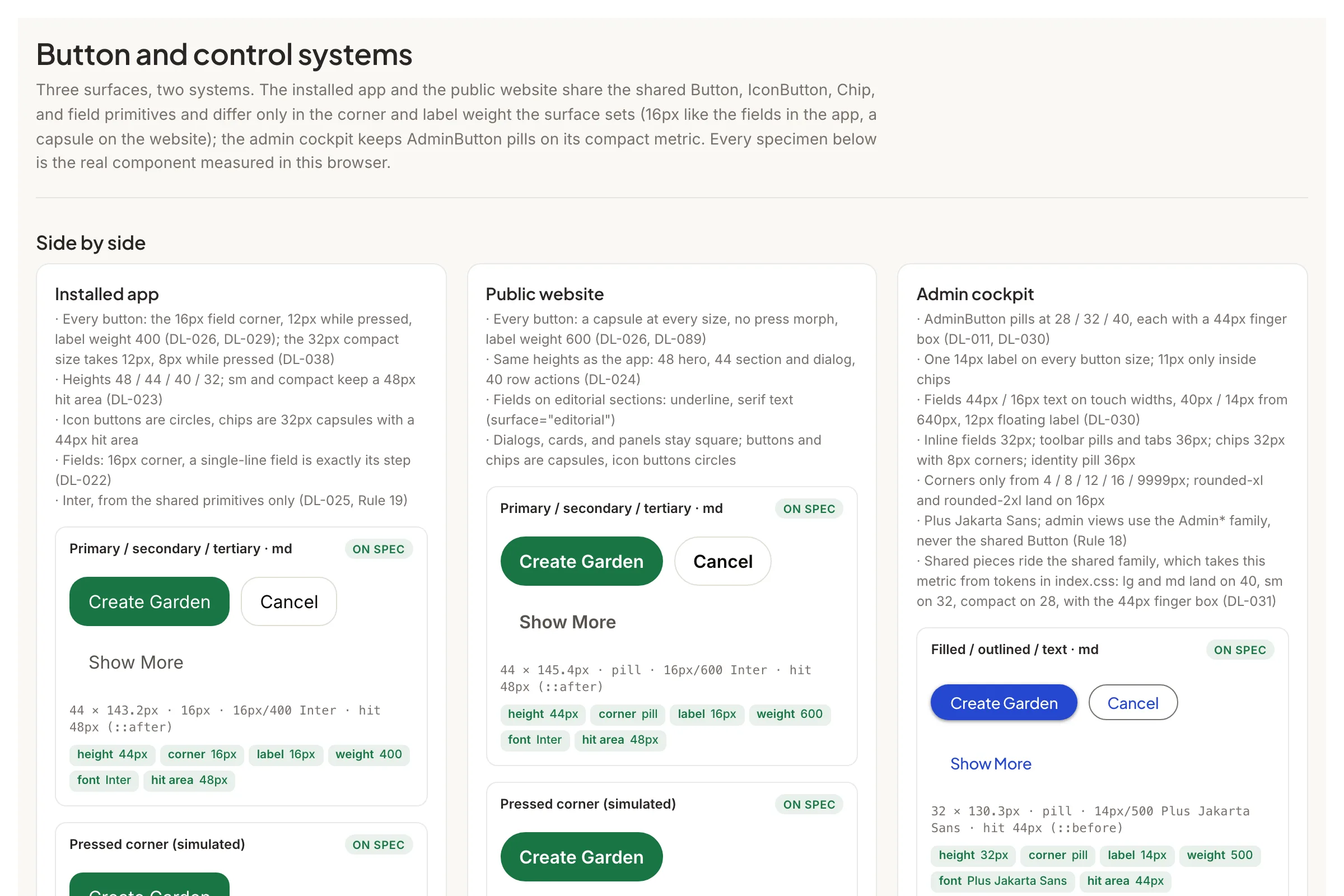
- Shape. Buttons take one corner per surface whatever their emphasis: the 16px field corner in the app (12px while pressed), a capsule on the website, pills in the cockpit. Fields are 16px, and buttons and fields share one height scale: 48, 44, 40, and 32px.
- Motion. Named spring tokens only, such as
--spring-spatialand--spring-effects. Nothing settles on a hand-written curve or duration. - Material and elevation. Five material thicknesses from ultrathin to solid, matched to content density, and five elevation layers from the substrate to overlays. Body text never sits on the thinnest glass.
Tokens at a glance
Every value below comes from the root DESIGN.md through a generated projection
(docs/src/data/design-tokens.json), so this page cannot disagree with the file that governs the
product. The Colors,
Typography, and
Shadows token stories
in Storybook show the same values on real components, in both themes.
Colors
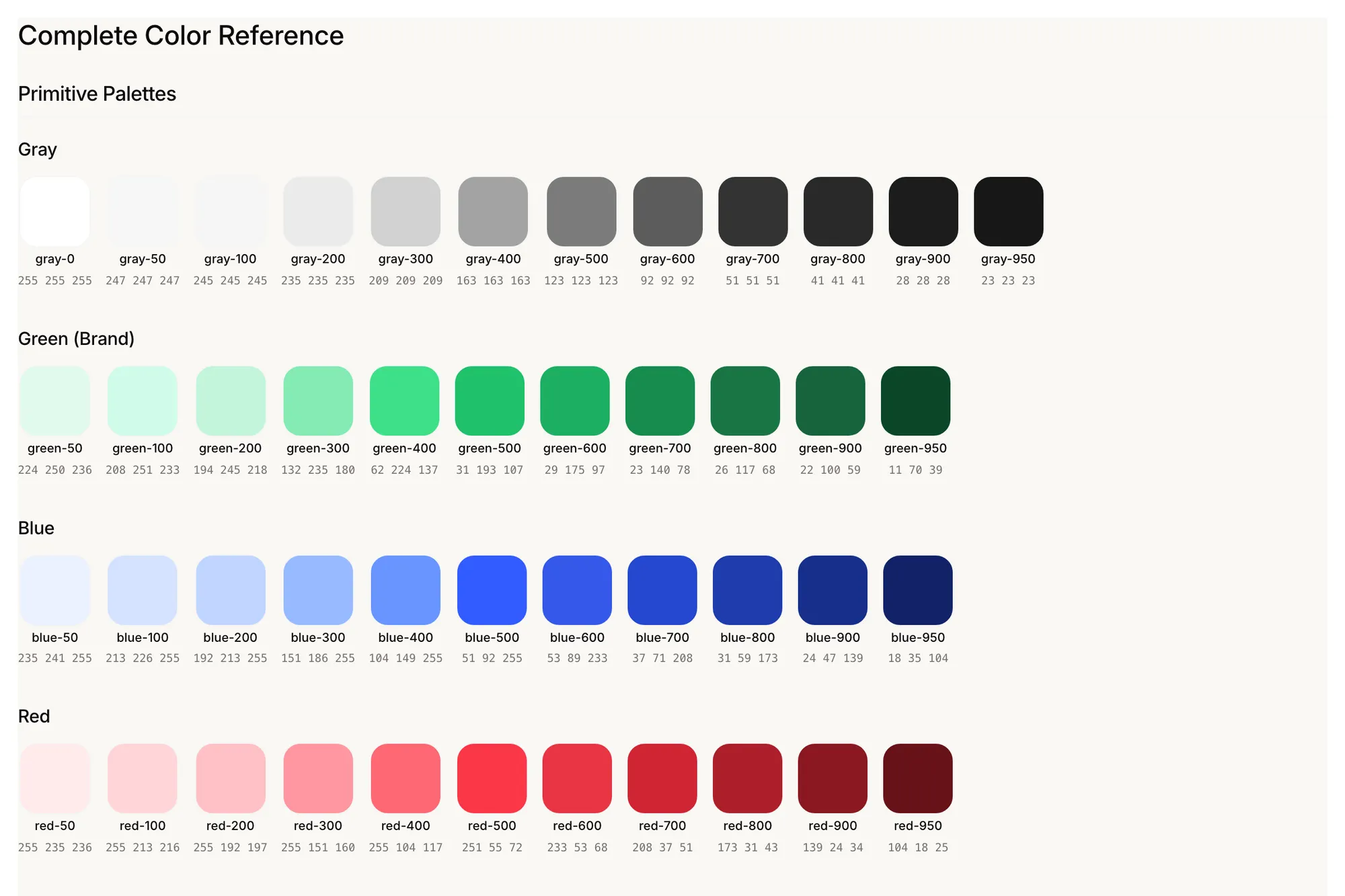
Sixteen named colors. Ink and canvas carry the reading surfaces; the greens carry every action.
#292524#F5F5F4#78716C#A8A29E#FAF8F5#1C1917#1FC16B#1A7544#16643B#C2F5DA#84EBB4#0B4627#FFFFFF#0C0A09#D97706#3B82F6Pairings
Text on fill, as the components use them. Each one is a contract from the root DESIGN.md.
Type
Inter for the interface, Fraunces for editorial moments. Each sample loads the fonts the app loads, so it renders at its token's own weight.
Regenerative work, made visible
Regenerative work, made visible
Regenerative work, made visible
Regenerative work, made visible
Radii and spacing
Seven corner radii and three spacing steps. In the installed app, cards, fields, and buttons take the 16px lg corner; the 12px squircle is the step inside them, for content nested in a card and for a pressed button.
From token to component
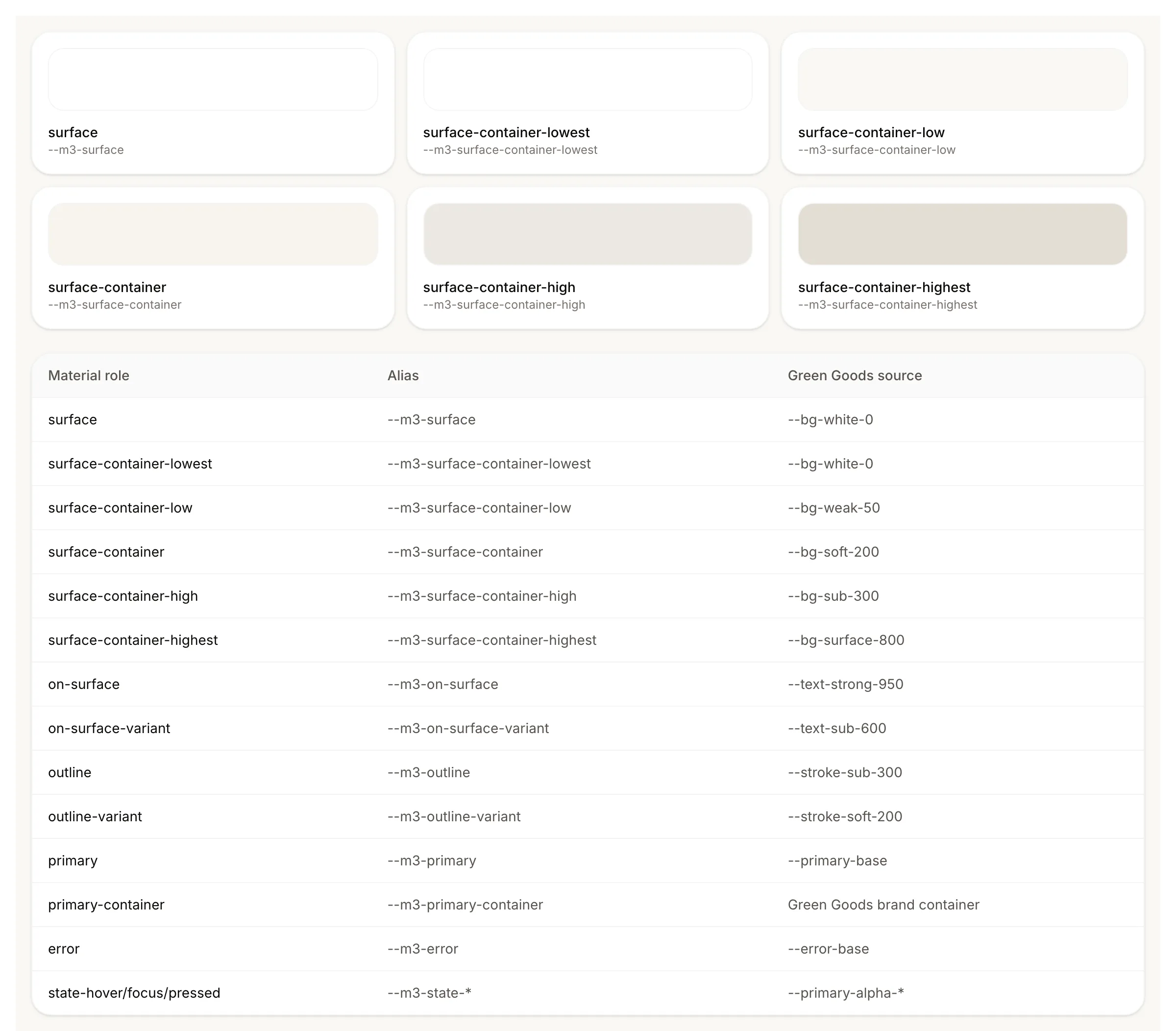
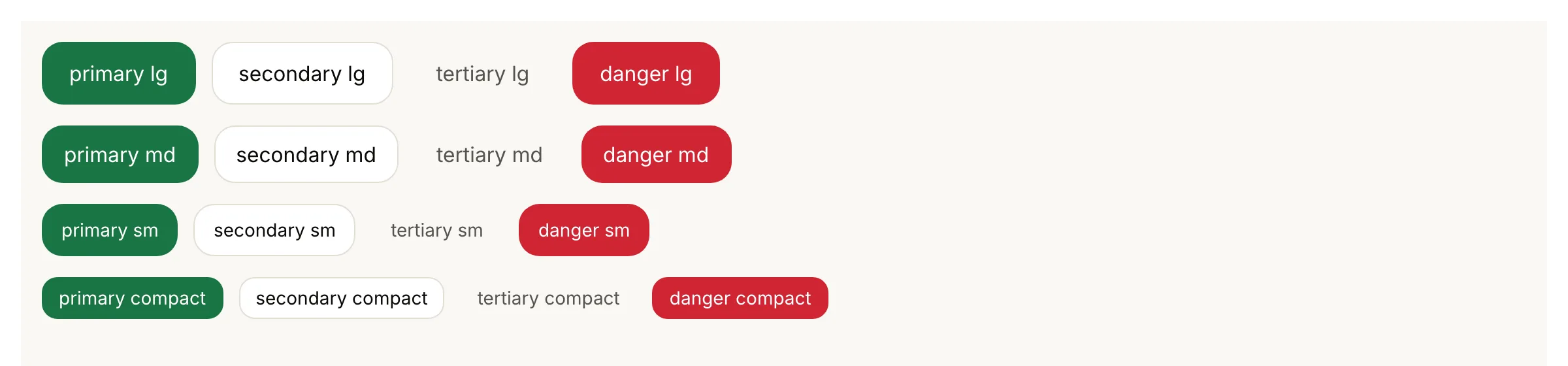
A token becomes a material role, a role becomes a surface, and a component sits on that surface. The role map shows the stack in both themes; the button catalog shows one primitive carrying every emphasis and size from the same tokens.
Three dialects
The dialects share tokens and terminology without pretending every audience has the same needs. Each has its own DesignMD file, and the hard rule between them is the chrome: a bottom app bar means the installed app, a site header means the website, and the Material 3 shell means the cockpit. Never mix them. The client and admin package pages describe the shells that enforce the split.
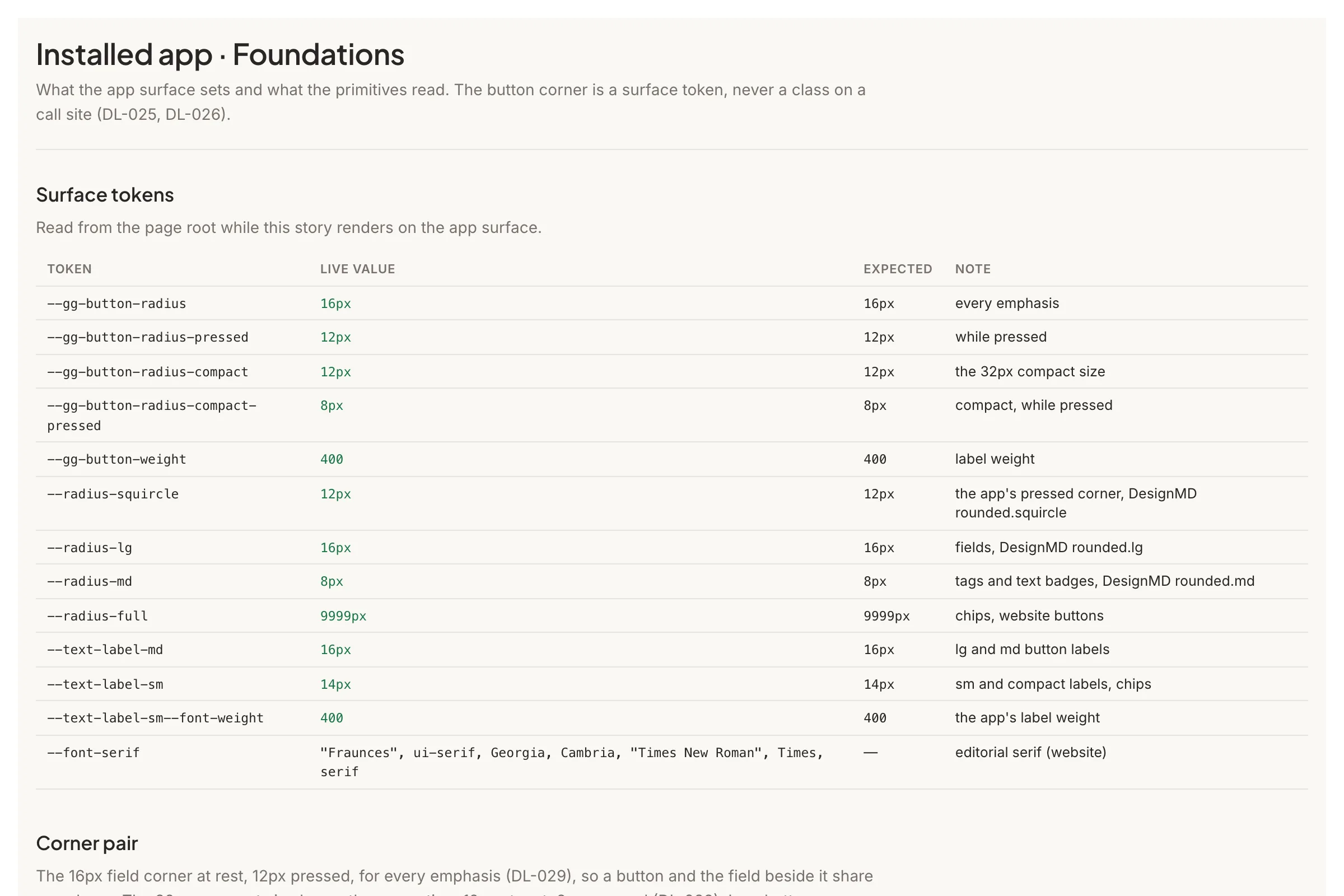
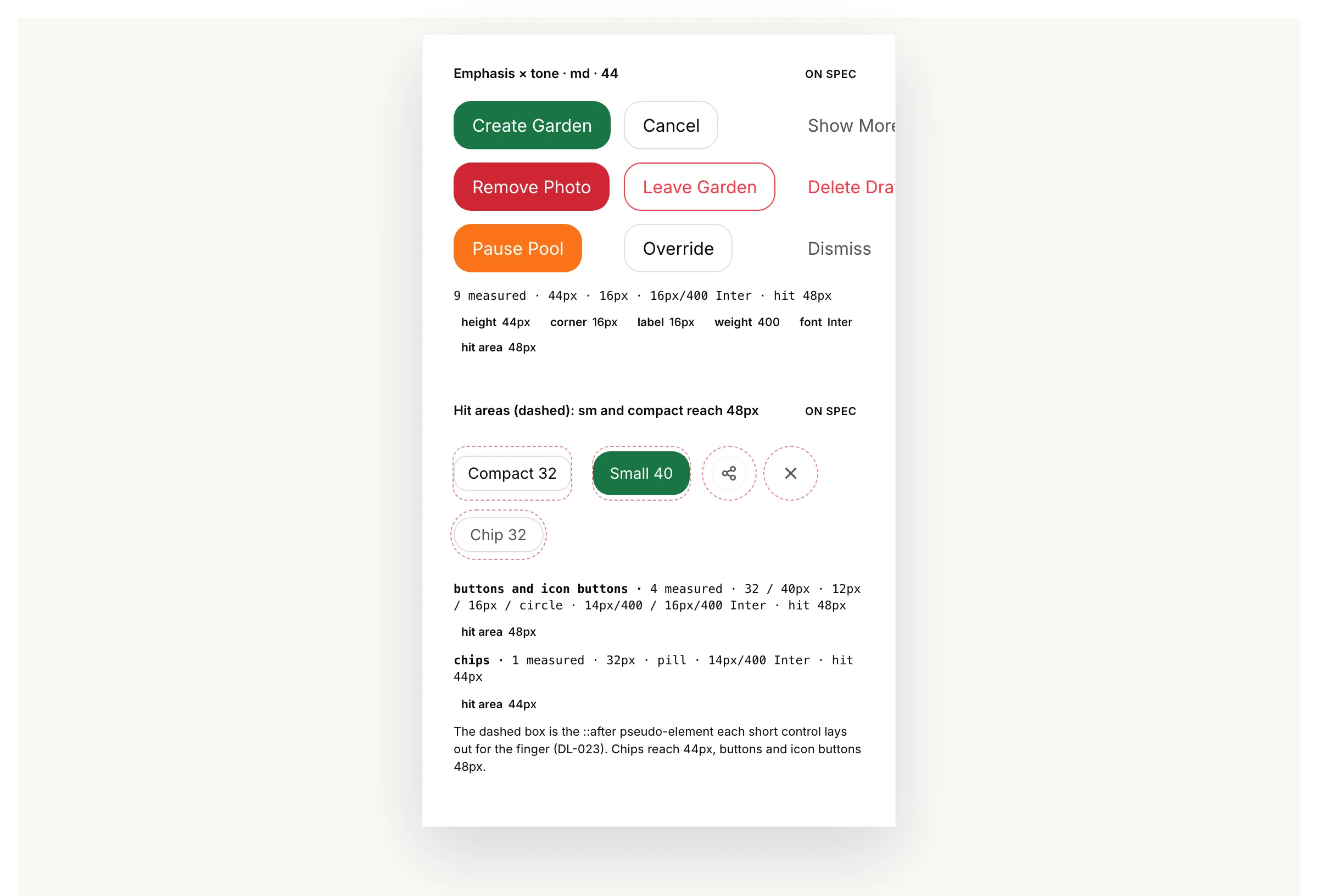
The installed app: a field journal
Gardeners install the client as a PWA and use it in the field, often offline. The dialect is
practical and personal: mobile-first and thumb-zone optimized, a bottom AppBar with Home,
Garden, and Profile, Inter only (a tool, not a magazine), the 16px field corner on every button
(it tightens to 12px while pressed), and warm offline states rather than red ones. Sheets carry most of the work: every bottom sheet names
one of four heights and shares one header, one action bar, and one loading anatomy, so a gardener
never relearns a screen. Its rules live in
packages/client/DESIGN.pwa.md.
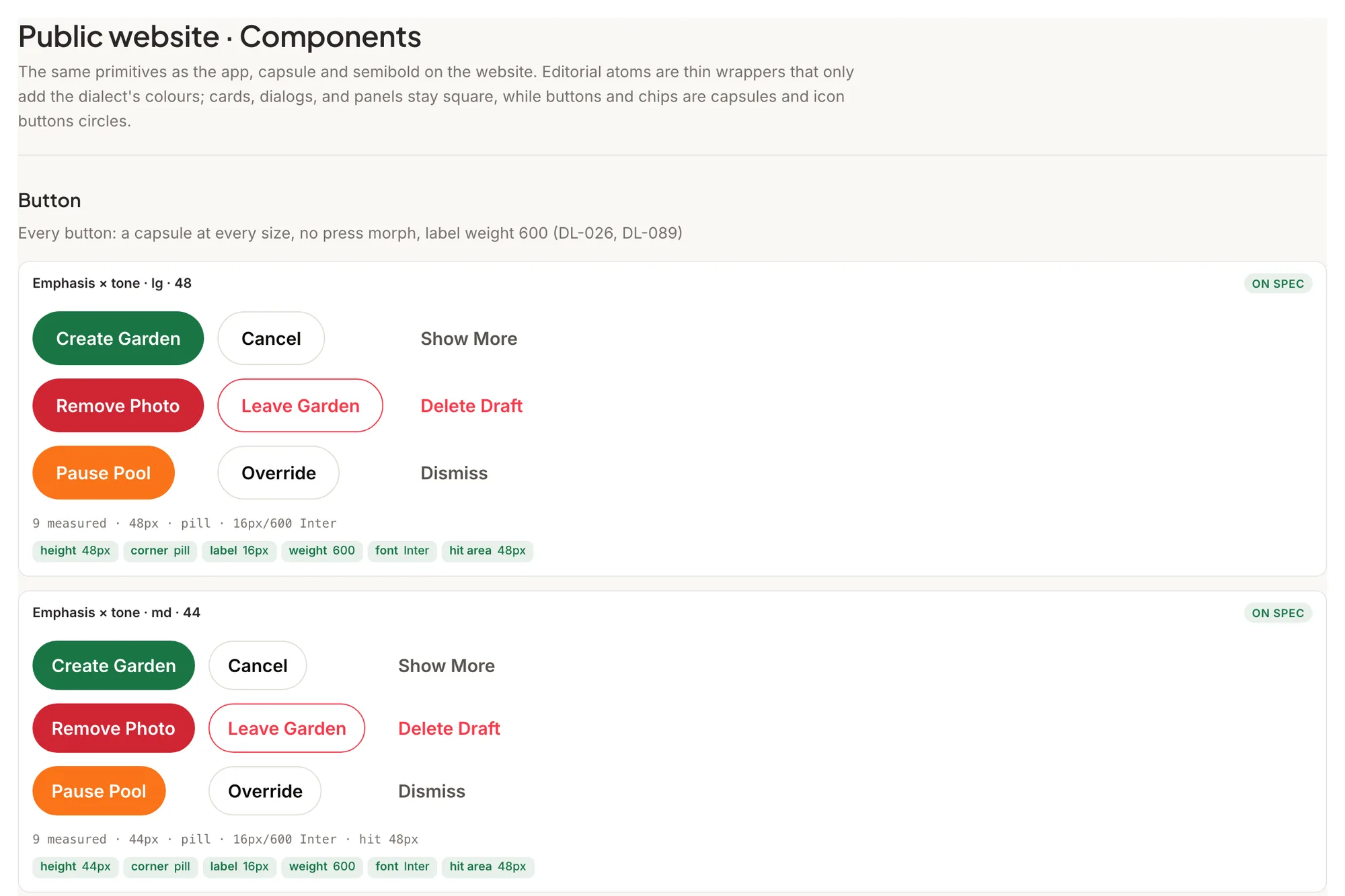
The public website: editorial
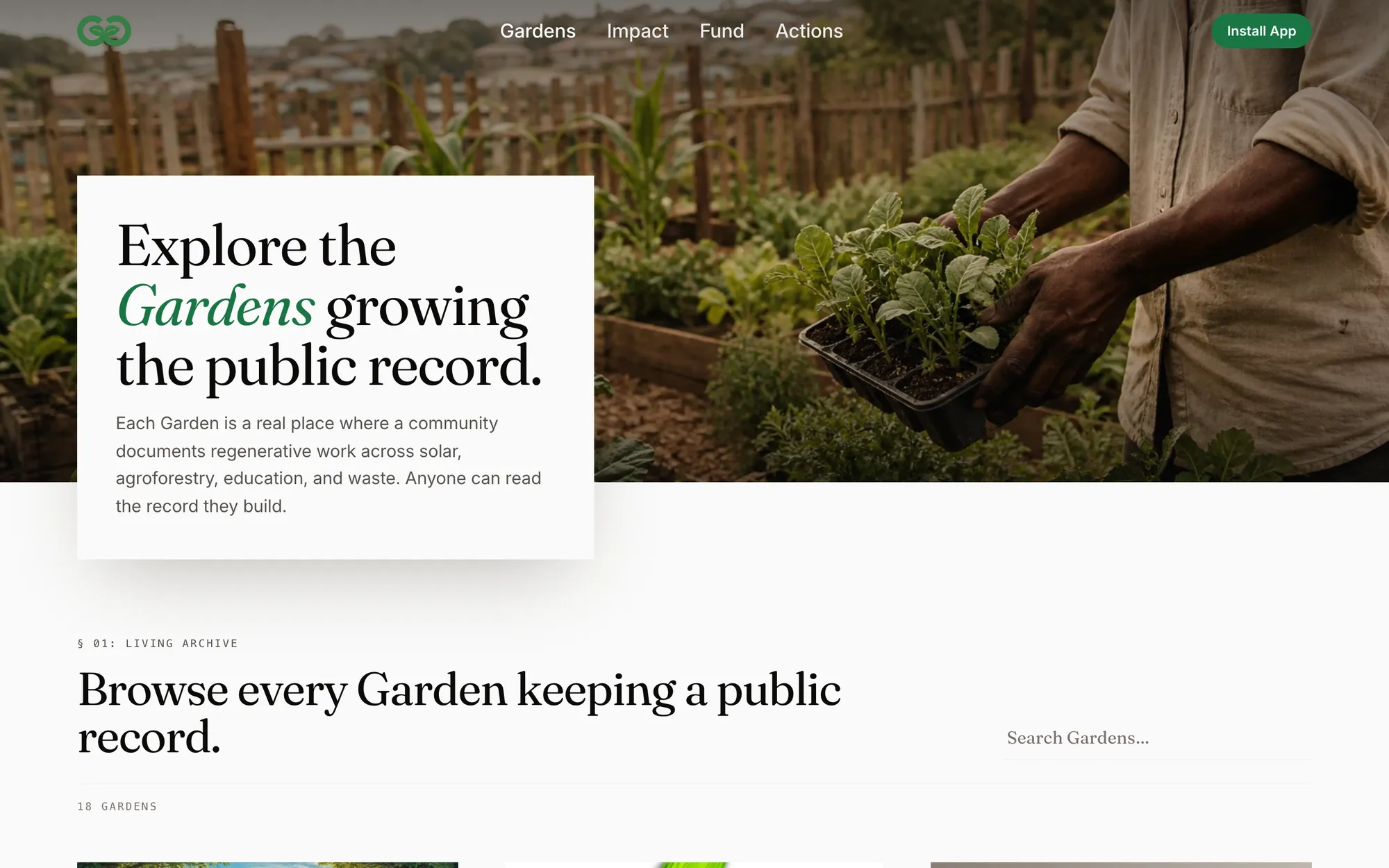
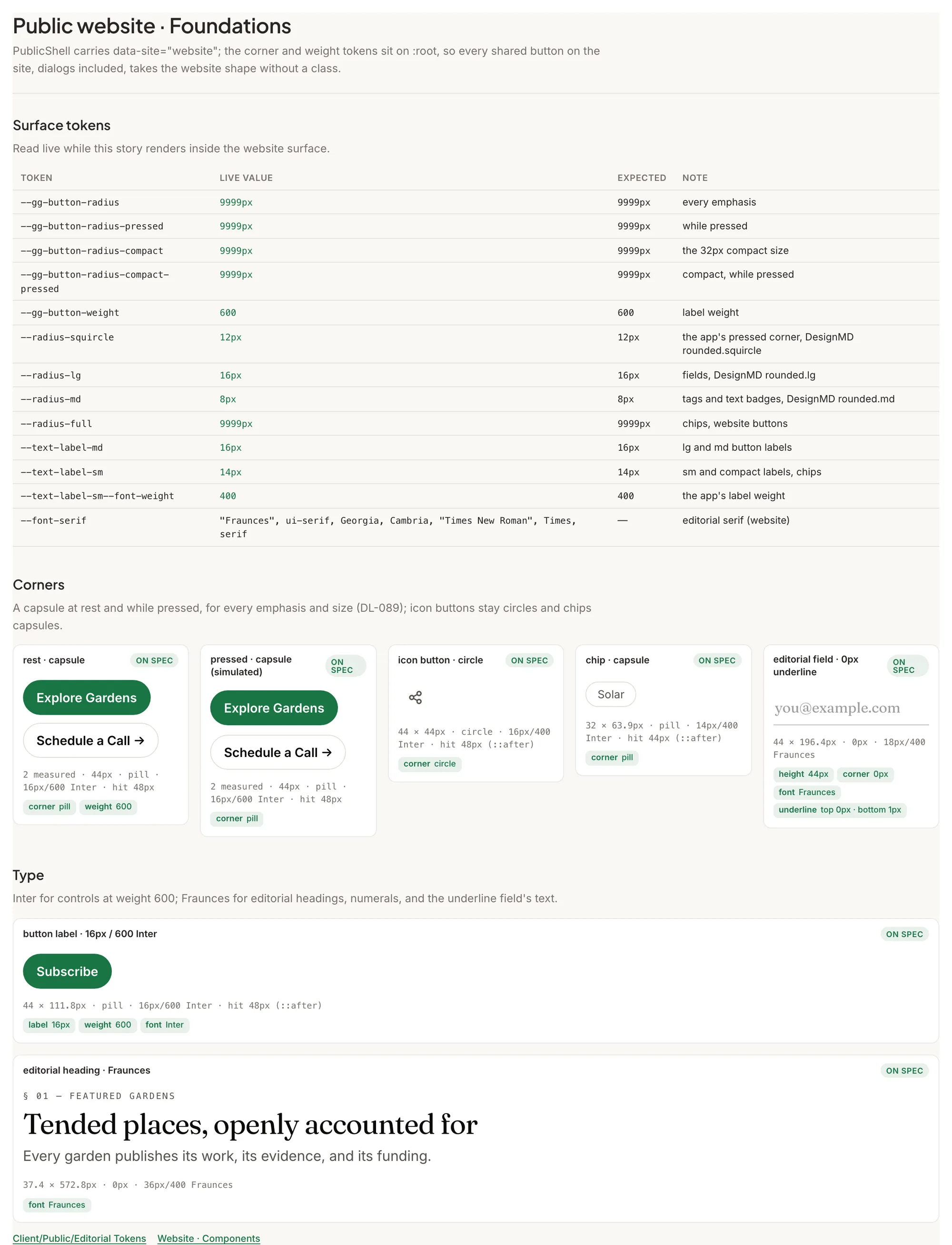
The browser site is a coffee-table garden journal crossed with a living public record: a sticky,
transparent SiteHeader, Fraunces headlines at magazine sizes with Inter for everything else,
capsule buttons on square cards and panels, generous photography, and editorial sections that stay
warm walnut in dark mode rather than cold gray. The home page and the four navigation pages
(Gardens, Impact, Fund, Actions) open on a three-line hero title at every width, and the accent
green is reserved for the install and support calls to action. Its rules live in
packages/client/DESIGN.browser.md.
The admin cockpit: Material 3, strictly
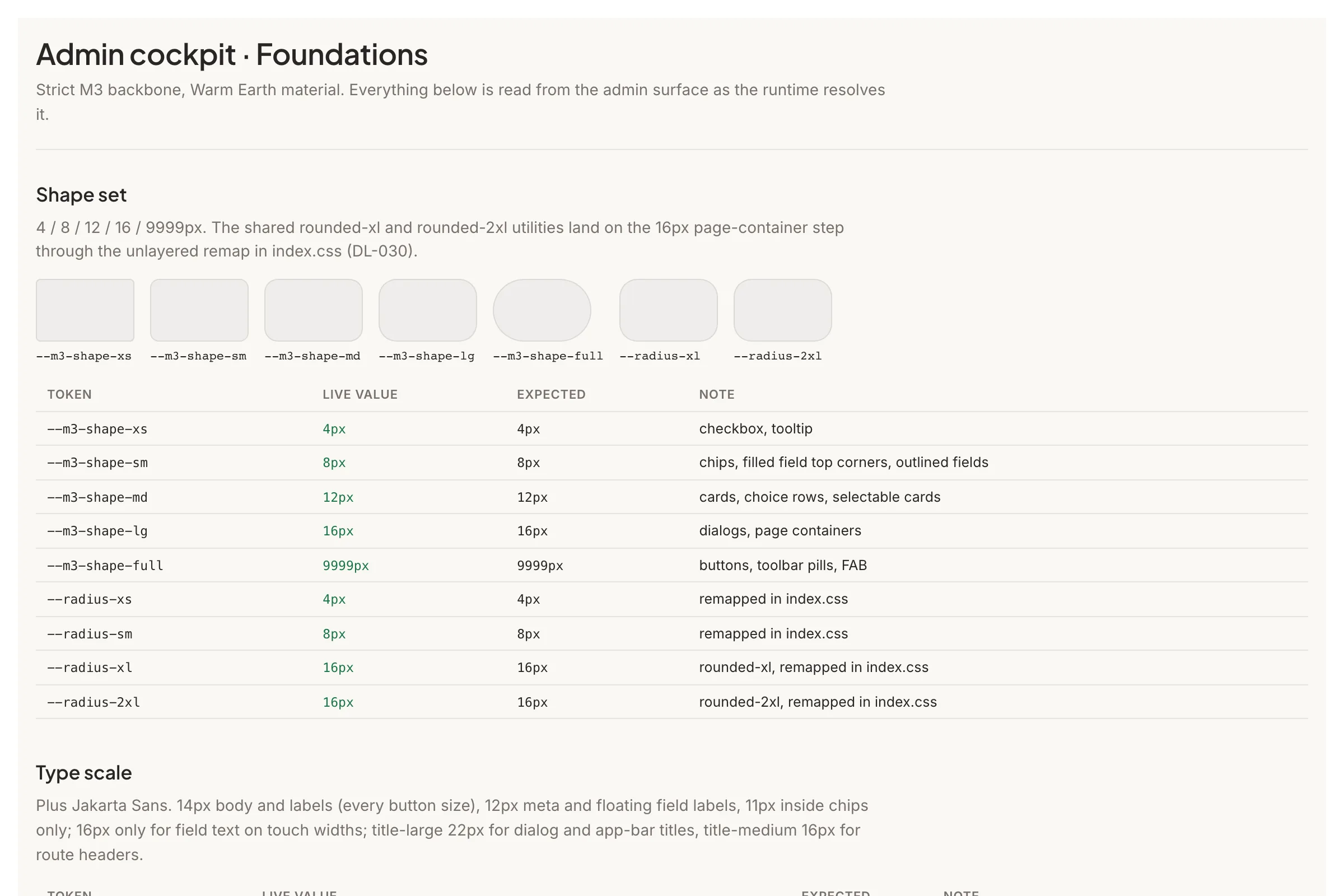
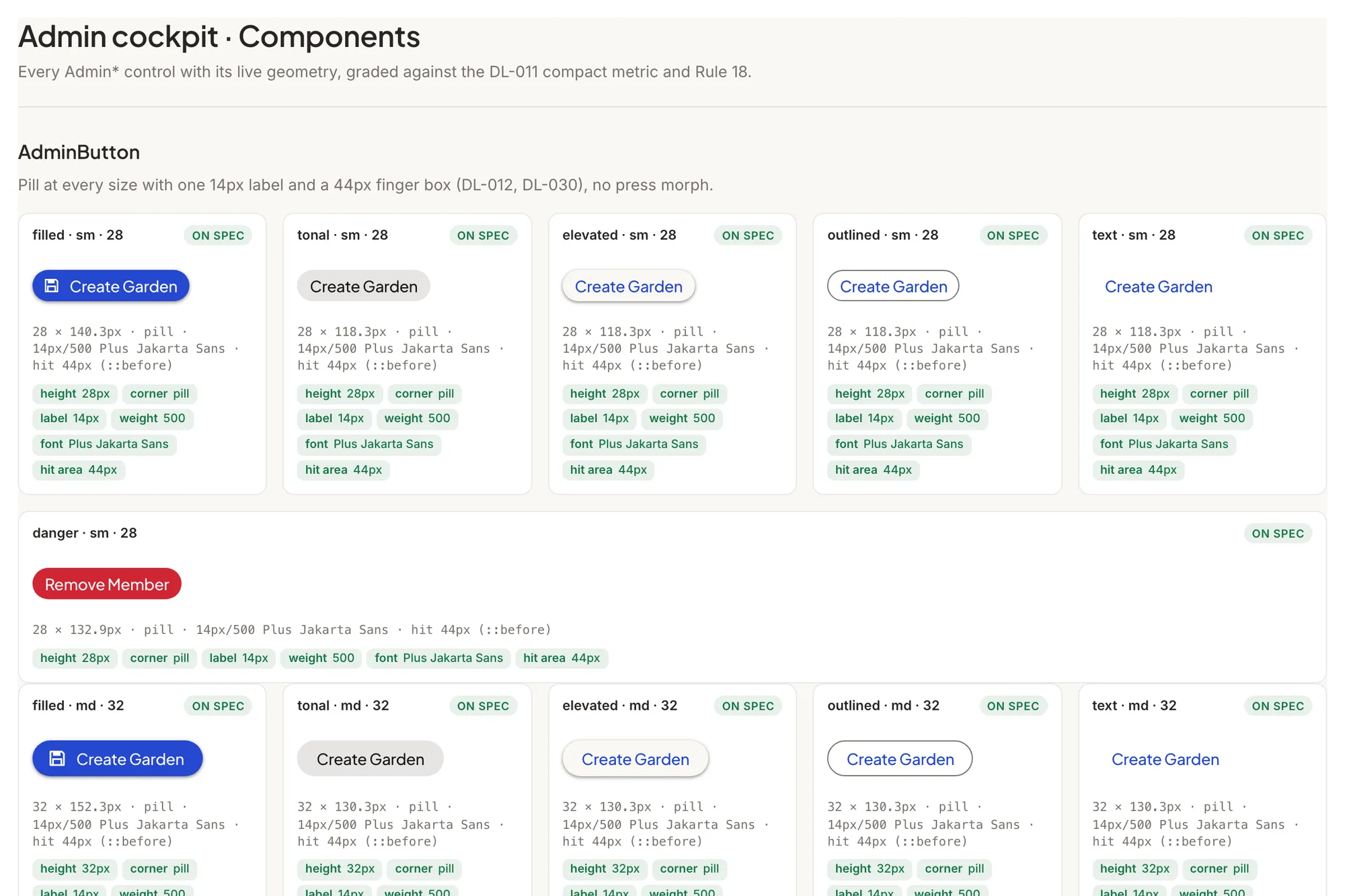
Stewards and evaluators work in the cockpit, and its litmus test is blunt: if it would be out of
place in Linear, GitHub, or Stripe's dashboard, it is out of place here. The same linen canvas and
charcoal ink, but no serif, no lookbook layouts, and Plus Jakarta Sans throughout. Material Design 3
is the strict structural backbone, with exact component dimensions, M3 state layers, a six-step
shape scale, and one elevation ladder; spring motion is the only permitted deviation. The nav dock
(the NavigationBar and the FAB) is the only translucent surface, dialogs and side sheets and
dense content stay solid, and each workspace tints the canvas with its own tone. Its rules live in
packages/admin/DESIGN.md.
These docs
A quiet reading space: Manrope body, Bricolage Grotesque headings, a plain Docusaurus shell, and
one primary green for active navigation everywhere. No cockpit chrome, no bottom navigation, no
hero treatment. Its rules live in
docs/DESIGN.md.
How the system is governed
DesignMD files own the visual rules, and they nest: start at the root
DESIGN.md, then
read the DesignMD nearest the surface you're changing. Shared UI foundations live in
shared with Storybook coverage, and the live Storybook at
design.greengoods.app is the source of truth for what every
primitive looks like in both themes. Executable guards keep token usage and shell composition
honest in CI, so drift is caught by machines, not memory.
When you change UI: reuse a shared primitive before composing raw layouts, keep new strings in all three locales, and check the matching Storybook story in the same pass.
Seven regenerative principles
Make the mycelium visible
Show how work, evidence, recognition, and funding connect. A user should be able to follow a value flow without learning protocol internals.
Design for succession
Match complexity to the community's current capability. New gardens need clear starting points; established gardens can carry denser coordination tools.
Enrich the edges
Give extra care to transitions between people and systems: gardener to steward, funder to garden, online to offline, and familiar web behavior to on-chain records.
Treat failure as a path forward
Recovery states should explain what happened, preserve work where possible, and make the next useful action obvious. Rejection, disconnection, and delayed confirmation need context, not blame.
Stay growth-agnostic
Measure verified regenerative outcomes and growing community capability, not compulsive engagement. Seasonal rhythms replace artificial urgency, rankings, and fear-of-missing-out patterns.
Make capability the deliverable
The product should help communities do more for themselves. A useful test is whether the people and records could remain legible if Green Goods were no longer the interface.
Choose regen over degen
Avoid trading-terminal aesthetics, financialized status displays, and dark patterns. Favor collective context, clear evidence, garden-level stories, and calm action.
Source traditions
These principles synthesize several traditions rather than claiming a new formal discipline:
- Ethan Roland and Gregory Landua's Eight Forms of Capital broaden how value is described beyond money.
- Kate Raworth's distributive and regenerative design framing asks systems to share value and operate within living limits.
- Elinor Ostrom's commons research informs local rules, transparent roles, monitoring, and nested governance.
- Suzanne Simard's work on forest networks and ecological research on succession and edge effects provide metaphors for visible flows, maturity, and boundary conditions.
- Regenesis, biomimicry, post-growth HCI, and Self-Determination Theory inform the emphasis on capability, context, autonomy, and non-extractive motivation.
- Solarpunk and Greenpill writing provide an optimistic visual and cultural frame for coordination around public goods.
Design resources
- The live Storybook for every shared primitive and its states, with the token stories (Colors, Typography, Shadows, Material roles) as the visual reference for the values on this page, and one Foundations and one Components story per dialect under Design System.
- The Figma design system for exploration; checked-in DesignMD and code remain the implementation authorities.
- The product vision post and a product walkthrough for the wider story.
Next steps
- Architecture for the system these surfaces sit on.
- Client and Admin for the shells that enforce the dialects.
- Anatomy of a Work Submission to see the field-journal surface doing its job.